<?xml version="1.0" encoding="utf-8"?><feed xmlns="http://www.w3.org/2005/Atom" ><generator uri="https://jekyllrb.com/" version="3.10.0">Jekyll</generator><link href="https://sakshaymahna.github.io/humanoid-walking-lab/feed.xml" rel="self" type="application/atom+xml" /><link href="https://sakshaymahna.github.io/humanoid-walking-lab/" rel="alternate" type="text/html" /><updated>2026-10-16T18:43:26+05:30</updated><id>https://sakshaymahna.github.io/humanoid-walking-lab/feed.xml</id><title type="html">Humanoid Walking Lab</title><subtitle>Weekly notes on learning humanoid locomotion with MuJoCo and PyTorch</subtitle><entry><title type="html">Week 2 — Making the G1 Walk</title><link href="https://sakshaymahna.github.io/humanoid-walking-lab/blog/2026/10/15/week-2.html" rel="alternate" type="text/html" title="Week 2 — Making the G1 Walk" /><published>2026-10-15T00:00:00+05:30</published><updated>2026-10-15T00:00:00+05:30</updated><id>https://sakshaymahna.github.io/humanoid-walking-lab/blog/2026/10/15/week-2</id><content type="html" xml:base="https://sakshaymahna.github.io/humanoid-walking-lab/blog/2026/10/15/week-2.html"><![CDATA[<p>Last week I learned MuJoCo with a single pendulum. This week I moved to the real robot. The goal: take the trained walking policy from <a href="https://github.com/RoboticsLabURJC/2025-tfg-diego-lopez">Diego López’s project</a>, run it on the Unitree G1 in my own MuJoCo setup, and understand every number that goes in and out.</p>

<p>The robot walked. Then it refused to turn on the spot. Finding out why led me to a second policy, Unitree’s own from <a href="https://github.com/unitreerobotics/unitree_rl_mjlab">unitree_rl_mjlab</a>, and a small experiment.</p>

<p>All the code is in the <a href="https://github.com/SakshayMahna/humanoid-walking-lab/tree/main/exercises"><code class="language-plaintext highlighter-rouge">exercises/</code></a> folder.</p>

<h2 id="setting-up-the-g1">Setting up the G1</h2>

<p>The G1 model file describes the robot’s body. It has no floor, no motors and no starting pose. I added these with MuJoCo’s <code class="language-plaintext highlighter-rouge">MjSpec</code>, which lets you edit a model in Python before you compile it:</p>

<div class="language-python highlighter-rouge"><div class="highlight"><pre class="highlight"><code><span class="n">spec</span> <span class="o">=</span> <span class="n">mujoco</span><span class="p">.</span><span class="n">MjSpec</span><span class="p">.</span><span class="n">from_file</span><span class="p">(</span><span class="s">"robot/g1.xml"</span><span class="p">)</span>
<span class="n">apply_collision_settings</span><span class="p">(</span><span class="n">spec</span><span class="p">)</span>            <span class="c1"># which parts touch, how the feet grip
</span><span class="n">add_floor</span><span class="p">(</span><span class="n">spec</span><span class="p">)</span>
<span class="n">actuator_names</span> <span class="o">=</span> <span class="n">add_position_actuators</span><span class="p">(</span><span class="n">spec</span><span class="p">)</span>   <span class="c1"># 29 motors, gains from motor specs
</span><span class="n">add_init_keyframe</span><span class="p">(</span><span class="n">spec</span><span class="p">,</span> <span class="n">actuator_names</span><span class="p">)</span>         <span class="c1"># knees-bent starting pose, pelvis at 0.76 m
</span><span class="n">apply_solver_settings</span><span class="p">(</span><span class="n">spec</span><span class="p">)</span>               <span class="c1"># 5 ms timestep = 200 physics steps per second
</span><span class="n">model</span> <span class="o">=</span> <span class="n">spec</span><span class="p">.</span><span class="nb">compile</span><span class="p">()</span>
</code></pre></div></div>

<p>The full function is <code class="language-plaintext highlighter-rouge">build_g1_model</code> in <a href="https://github.com/SakshayMahna/humanoid-walking-lab/blob/main/exercises/g1_utils.py"><code class="language-plaintext highlighter-rouge">g1_utils.py</code></a>.</p>

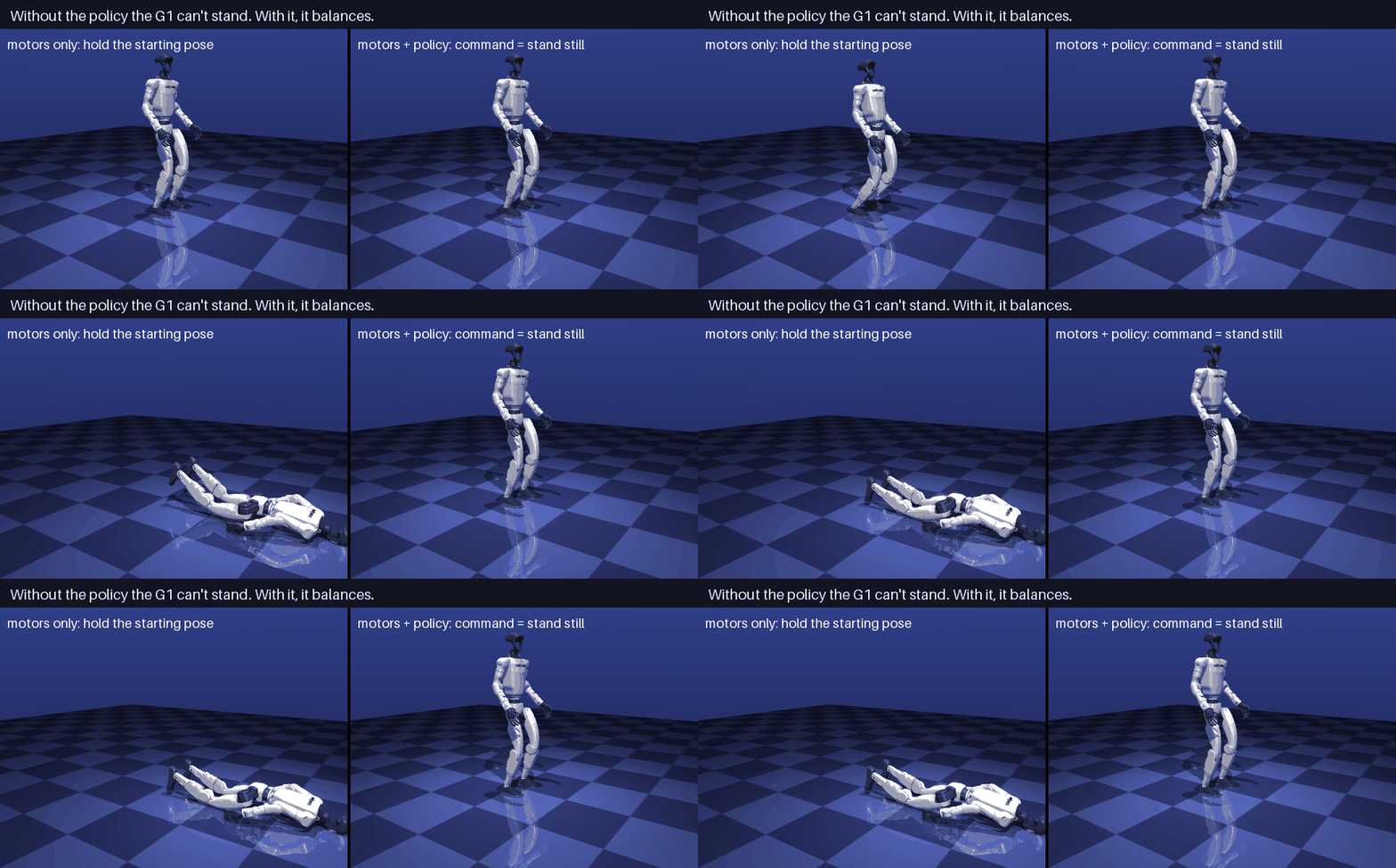
<p>One surprise: with the policy’s gains, the robot <strong>cannot stand on its own</strong>. It slowly sinks and falls over. The gains are soft on purpose. The trained policy is what keeps the robot balanced. Without it, a humanoid is just an inverted pendulum.</p>

<p><img src="/humanoid-walking-lab/assets/images/week-2/stand_vs_policy.gif" alt="Without the policy the G1 falls; with it, it balances" /></p>

<p>Three parts of the setup took me some time to understand: which parts touch, how the feet grip, and where the motors’ “armature” comes from.</p>

<h3 id="which-parts-touch-collision-bits">Which parts touch: collision bits</h3>

<p>A robot model has two kinds of shapes:</p>

<ul>
  <li><strong>Visual meshes</strong>: detailed 3D models that make the robot look right.</li>
  <li><strong>Collision geoms</strong>: simple capsules and spheres that stand in for the body when things touch.</li>
</ul>

<p>Checking contacts with detailed meshes would be slow, so the G1 uses 33 simple shapes for collisions: 14 small capsules under the feet and 19 others on the legs, pelvis and arms.</p>

<p>MuJoCo uses two numbers per shape to decide what can touch what: <code class="language-plaintext highlighter-rouge">contype</code> and <code class="language-plaintext highlighter-rouge">conaffinity</code>. Two shapes A and B can collide if:</p>

\[(\text{contype}_A \;\&amp;\; \text{conaffinity}_B) \neq 0 \quad\text{or}\quad (\text{contype}_B \;\&amp;\; \text{conaffinity}_A) \neq 0\]

<p>The <code class="language-plaintext highlighter-rouge">&amp;</code> compares the two numbers bit by bit. Think of <code class="language-plaintext highlighter-rouge">contype</code> as “the groups I am in” and <code class="language-plaintext highlighter-rouge">conaffinity</code> as “the groups I collide with”. If either shape accepts the other, they collide.</p>

<table>
  <thead>
    <tr>
      <th>Shapes</th>
      <th>contype / conaffinity</th>
      <th>Collide with the floor (1 / 1)?</th>
    </tr>
  </thead>
  <tbody>
    <tr>
      <td>Collision capsules</td>
      <td>1 / 1</td>
      <td><code class="language-plaintext highlighter-rouge">1 &amp; 1 = 1</code>: yes</td>
    </tr>
    <tr>
      <td>Visual meshes</td>
      <td>0 / 0</td>
      <td><code class="language-plaintext highlighter-rouge">1 &amp; 0 = 0</code> both ways: no</td>
    </tr>
  </tbody>
</table>

<p>The capsules are also 1 / 1 with each other, so the robot’s limbs can hit each other too. MuJoCo skips each body’s direct parent automatically, and a short <code class="language-plaintext highlighter-rouge">&lt;exclude&gt;</code> list in the model turns off a few more pairs.</p>

<p>The bits can do more than on and off. The training code has a “no self-collision” option that sets the robot’s capsules to <code class="language-plaintext highlighter-rouge">contype = 0, conaffinity = 1</code>:</p>

<ul>
  <li><strong>Robot and floor:</strong> floor <code class="language-plaintext highlighter-rouge">contype</code> 1 &amp; capsule <code class="language-plaintext highlighter-rouge">conaffinity</code> 1 = 1. They collide.</li>
  <li><strong>Robot and robot:</strong> <code class="language-plaintext highlighter-rouge">0 &amp; 1 = 0</code> both ways. They don’t.</li>
</ul>

<p>With one pair of numbers, the feet stay on the ground while the legs can pass through each other.</p>

<h3 id="friction-how-the-feet-grip">Friction: how the feet grip</h3>

<p>Walking only works if the feet don’t slide. When a foot presses on the floor, the force has two parts: the <strong>normal force</strong> straight up, and the <strong>friction force</strong> along the floor. Friction can be anything up to a limit, and the limit grows with how hard the foot presses:</p>

\[|F_{\text{friction}}| \le \mu \, F_{\text{normal}}\]

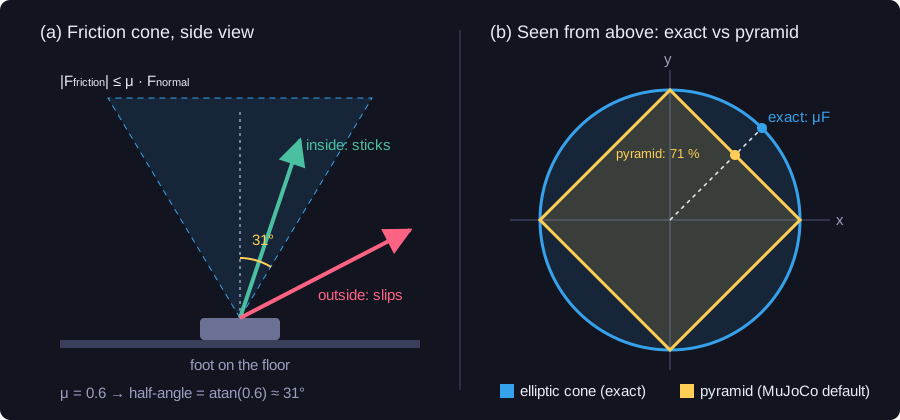
<p>The G1’s feet use \(\mu = 0.6\), about rubber on a hard floor. If you draw the total force as one arrow, this rule says the arrow must stay inside a <strong>cone</strong> around the vertical, \(\arctan(0.6) \approx 31°\) wide on each side. Inside the cone the foot sticks. Outside, it slips.</p>

<p><img src="/humanoid-walking-lab/assets/images/week-2/friction_cone.svg" alt="Friction cone and its pyramid approximation" /></p>

<p>For the 33 kg robot standing still, that is about 196 N of sideways grip. It also limits how fast the robot can speed up: at most \(\mu g \approx 5.9\) m/s². No controller can push harder than the floor allows.</p>

<p><strong><code class="language-plaintext highlighter-rouge">condim</code></strong> sets how many directions a contact can push in:</p>

<table>
  <thead>
    <tr>
      <th><code class="language-plaintext highlighter-rouge">condim</code></th>
      <th>Resists</th>
      <th>Used for</th>
    </tr>
  </thead>
  <tbody>
    <tr>
      <td>1</td>
      <td>nothing along the floor (no friction)</td>
      <td>the robot’s other capsules</td>
    </tr>
    <tr>
      <td>3</td>
      <td>sliding in both directions</td>
      <td><strong>the feet</strong></td>
    </tr>
    <tr>
      <td>4</td>
      <td>sliding + twisting</td>
      <td>—</td>
    </tr>
    <tr>
      <td>6</td>
      <td>sliding + twisting + rolling</td>
      <td>—</td>
    </tr>
  </tbody>
</table>

<p>The feet get <code class="language-plaintext highlighter-rouge">condim = 3</code>, enough to walk. The other capsules get <code class="language-plaintext highlighter-rouge">condim = 1</code>: if two knees bump, they just slide apart, and that is also faster to compute.</p>

<p><strong>Whose friction wins.</strong> A foot touching the floor is two shapes, each with its own friction. By default MuJoCo uses the bigger one, so the floor’s 1.0 would beat the foot’s 0.6. So the feet get a higher <strong>priority</strong> (1, the floor has 0), and the higher-priority shape’s settings are used. Without this, the robot would walk on a grippier floor than the one it was trained on.</p>

<p><strong>Pyramid or cone.</strong> A perfectly round cone is slow to solve, so by default MuJoCo uses a <strong>pyramid</strong> instead. With <code class="language-plaintext highlighter-rouge">condim = 3</code> the pyramid has 4 sides. Seen from above (panel b), the cone is a circle and the pyramid is a diamond inside it. Along the axes they match, but on the diagonals the pyramid gives only 71 % of the real grip. MuJoCo also offers an exact cone, <code class="language-plaintext highlighter-rouge">cone="elliptic"</code>, which is slower. The training framework (mjlab) uses the pyramid, and so do I: the policy learned to walk with it.</p>

<p>All of this is one small function, <code class="language-plaintext highlighter-rouge">apply_collision_settings</code> in <a href="https://github.com/SakshayMahna/humanoid-walking-lab/blob/main/exercises/g1_utils.py"><code class="language-plaintext highlighter-rouge">g1_utils.py</code></a> (slightly shortened here):</p>

<div class="language-python highlighter-rouge"><div class="highlight"><pre class="highlight"><code><span class="k">for</span> <span class="n">geom</span> <span class="ow">in</span> <span class="n">spec</span><span class="p">.</span><span class="n">geoms</span><span class="p">:</span>
    <span class="k">if</span> <span class="n">re</span><span class="p">.</span><span class="n">fullmatch</span><span class="p">(</span><span class="n">FOOT_PATTERN</span><span class="p">,</span> <span class="n">geom</span><span class="p">.</span><span class="n">name</span><span class="p">):</span>        <span class="c1"># the 14 foot capsules
</span>        <span class="n">geom</span><span class="p">.</span><span class="n">condim</span><span class="p">,</span> <span class="n">geom</span><span class="p">.</span><span class="n">priority</span> <span class="o">=</span> <span class="mi">3</span><span class="p">,</span> <span class="mi">1</span>
        <span class="n">geom</span><span class="p">.</span><span class="n">friction</span><span class="p">[</span><span class="mi">0</span><span class="p">]</span> <span class="o">=</span> <span class="mf">0.6</span>
        <span class="n">geom</span><span class="p">.</span><span class="n">contype</span> <span class="o">=</span> <span class="n">geom</span><span class="p">.</span><span class="n">conaffinity</span> <span class="o">=</span> <span class="mi">1</span>
    <span class="k">elif</span> <span class="n">re</span><span class="p">.</span><span class="n">fullmatch</span><span class="p">(</span><span class="s">".*_collision"</span><span class="p">,</span> <span class="n">geom</span><span class="p">.</span><span class="n">name</span><span class="p">):</span>    <span class="c1"># other collision capsules
</span>        <span class="n">geom</span><span class="p">.</span><span class="n">condim</span><span class="p">,</span> <span class="n">geom</span><span class="p">.</span><span class="n">priority</span> <span class="o">=</span> <span class="mi">1</span><span class="p">,</span> <span class="mi">0</span>
        <span class="n">geom</span><span class="p">.</span><span class="n">contype</span> <span class="o">=</span> <span class="n">geom</span><span class="p">.</span><span class="n">conaffinity</span> <span class="o">=</span> <span class="mi">1</span>
    <span class="k">else</span><span class="p">:</span>                                            <span class="c1"># visual meshes: never collide
</span>        <span class="n">geom</span><span class="p">.</span><span class="n">contype</span> <span class="o">=</span> <span class="n">geom</span><span class="p">.</span><span class="n">conaffinity</span> <span class="o">=</span> <span class="mi">0</span>
</code></pre></div></div>

<h3 id="motors-and-gearboxes">Motors and gearboxes</h3>

<p>In Week 1, <code class="language-plaintext highlighter-rouge">armature</code> was just a number I added to a pendulum joint. On the G1 it comes from real hardware. Understanding it took me longer than anything else in the setup.</p>

<p>An electric motor spins fast but is weak. A gearbox trades speed for strength. With a gear ratio \(N\), the joint turns \(N\) times slower than the motor and gets \(N\) times the torque. The G1 uses <strong>planetary gearboxes</strong>, each with two stages.</p>

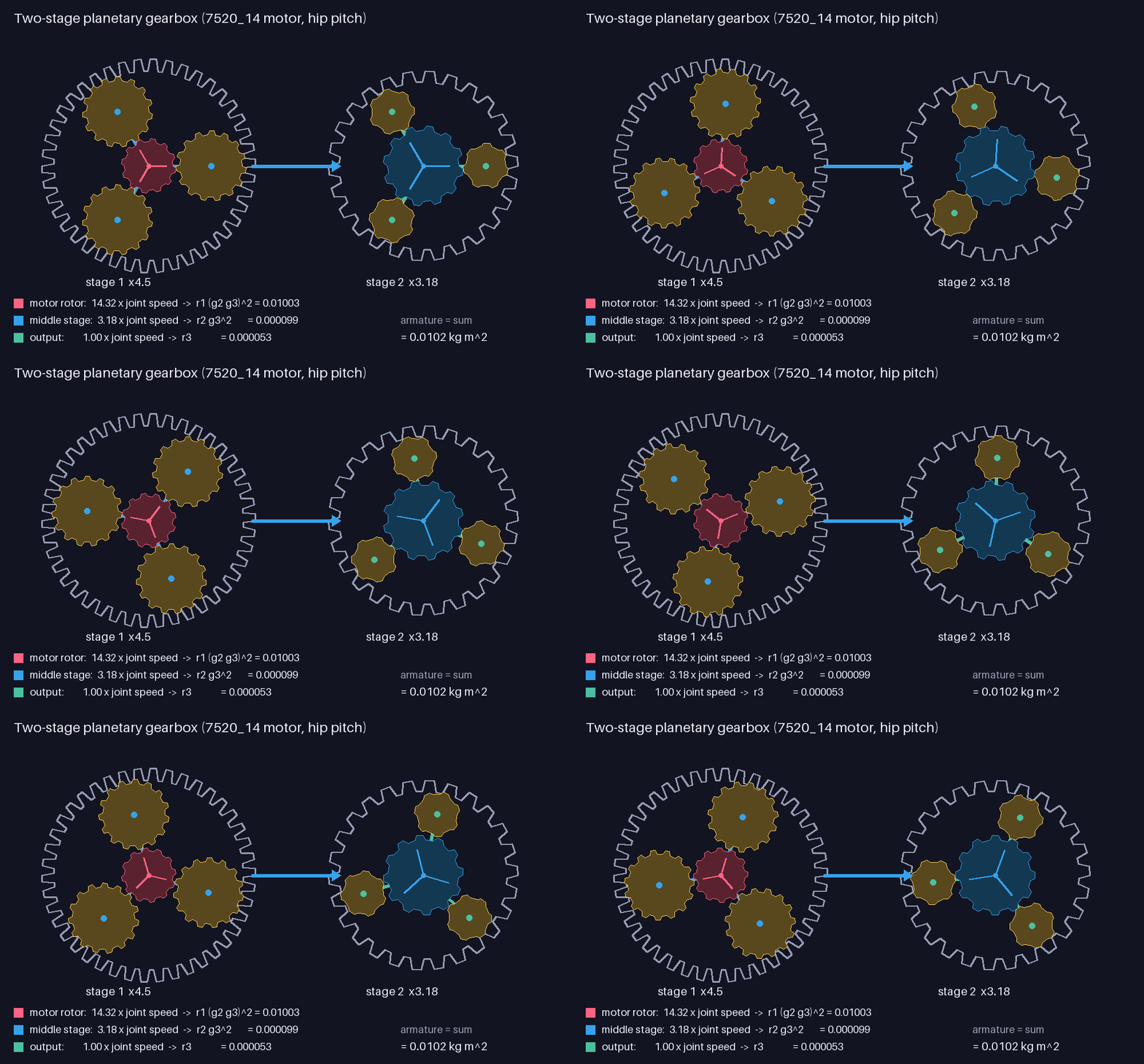
<p><img src="/humanoid-walking-lab/assets/images/week-2/planetary_gearbox.gif" alt="Two-stage planetary gearbox" /></p>

<p><strong>One stage.</strong> A planetary stage has a <strong>sun</strong> gear in the middle (the input), <strong>planet</strong> gears around it, and a fixed outer <strong>ring</strong>. The planets sit on a <strong>carrier</strong>, which is the output. When the sun turns, the planets roll along the ring and drag the carrier round, more slowly. How much slower depends only on the teeth:</p>

\[\text{ratio} = 1 + \frac{\text{ring teeth}}{\text{sun teeth}}\]

<p>That explains the odd numbers in the motor specs, like \(1 + 48/22 = 3.18\).</p>

<p><strong>Two stages.</strong> In the animation, the motor is the red sun of stage 1. Stage 1’s blue carrier turns 4.5 times slower and drives stage 2’s blue sun. Stage 2’s green carrier is the joint, another 3.18 times slower. The ratios multiply: \(4.5 \times 3.18 = 14.3\). That’s in the motor’s name: <strong>7520_14</strong>.</p>

<p><strong>Why the motor feels heavy at the joint.</strong> A spinning part stores energy \(\tfrac{1}{2} I \omega^2\). Say a part spins \(k\) times faster than the joint:</p>

\[\tfrac{1}{2}\, I \,(k\,\omega_{\text{joint}})^2 = \tfrac{1}{2}\,(I k^2)\,\omega_{\text{joint}}^2\]

<p>So from the joint’s point of view, that part weighs like \(I k^2\). The motor spins \(4.5 \times 3.18\) times faster than the joint, the middle stage 3.18 times, and the output just once. Adding all three gives the <strong>armature</strong>:</p>

\[\text{armature} = r_1\,(g_2\, g_3)^2 + r_2\, g_3^2 + r_3\]

<p>For the 7520_14 (the colored rows in the animation): 0.01003 + 0.000099 + 0.000053 = <strong>0.0102 kg·m²</strong>. The motor rotor is the lightest part, but it makes up <strong>98 %</strong> of the total, because its factor is the biggest: \(14.3^2 \approx 205\).</p>

<p>In code it’s two short functions, in <a href="https://github.com/SakshayMahna/humanoid-walking-lab/blob/main/exercises/g1_utils.py"><code class="language-plaintext highlighter-rouge">g1_utils.py</code></a>:</p>

<div class="language-python highlighter-rouge"><div class="highlight"><pre class="highlight"><code><span class="k">def</span> <span class="nf">reflected_inertia</span><span class="p">(</span><span class="n">rotor_inertias</span><span class="p">,</span> <span class="n">gears</span><span class="p">):</span>
    <span class="n">r1</span><span class="p">,</span> <span class="n">r2</span><span class="p">,</span> <span class="n">r3</span> <span class="o">=</span> <span class="n">rotor_inertias</span>
    <span class="n">g1</span><span class="p">,</span> <span class="n">g2</span><span class="p">,</span> <span class="n">g3</span> <span class="o">=</span> <span class="n">gears</span>
    <span class="k">return</span> <span class="n">r1</span> <span class="o">*</span> <span class="p">(</span><span class="n">g2</span> <span class="o">*</span> <span class="n">g3</span><span class="p">)</span><span class="o">**</span><span class="mi">2</span> <span class="o">+</span> <span class="n">r2</span> <span class="o">*</span> <span class="n">g3</span><span class="o">**</span><span class="mi">2</span> <span class="o">+</span> <span class="n">r3</span>

<span class="k">def</span> <span class="nf">motor_gains</span><span class="p">(</span><span class="n">armature</span><span class="p">,</span> <span class="n">natural_freq_hz</span><span class="o">=</span><span class="mf">10.0</span><span class="p">,</span> <span class="n">damping_ratio</span><span class="o">=</span><span class="mf">2.0</span><span class="p">):</span>
    <span class="n">wn</span> <span class="o">=</span> <span class="mi">2</span> <span class="o">*</span> <span class="n">np</span><span class="p">.</span><span class="n">pi</span> <span class="o">*</span> <span class="n">natural_freq_hz</span>          <span class="c1"># Hz -&gt; rad/s
</span>    <span class="k">return</span> <span class="n">armature</span> <span class="o">*</span> <span class="n">wn</span><span class="o">**</span><span class="mi">2</span><span class="p">,</span> <span class="mi">2</span> <span class="o">*</span> <span class="n">damping_ratio</span> <span class="o">*</span> <span class="n">armature</span> <span class="o">*</span> <span class="n">wn</span>   <span class="c1"># KP, KD
</span></code></pre></div></div>

<p>The G1 has four motor types:</p>

<table>
  <thead>
    <tr>
      <th>Motor</th>
      <th>Ratio</th>
      <th>Armature (kg·m²)</th>
      <th>Joints</th>
    </tr>
  </thead>
  <tbody>
    <tr>
      <td>5020</td>
      <td>16.0</td>
      <td>0.0036</td>
      <td>shoulders, elbows, wrist roll</td>
    </tr>
    <tr>
      <td>7520_14</td>
      <td>14.3</td>
      <td>0.0102</td>
      <td>hip pitch and yaw, waist yaw</td>
    </tr>
    <tr>
      <td>7520_22</td>
      <td>22.5</td>
      <td>0.0251</td>
      <td>hip roll, knees</td>
    </tr>
    <tr>
      <td>4010</td>
      <td>25.0</td>
      <td>0.00425</td>
      <td>wrist pitch and yaw</td>
    </tr>
  </tbody>
</table>

<p>The ankles and the waist pitch and roll each use <strong>two</strong> 5020 motors, so their numbers are doubled.</p>

<p><strong>From armature to gains.</strong> The training setup doesn’t tune each joint by hand. It picks the behavior it wants, a 10 Hz natural frequency and a damping ratio of 2, and uses last week’s formulas to get the gains:</p>

\[K_P = I\,\omega_n^2 \qquad K_D = 2\,\zeta\, I\, \omega_n \qquad (I = \text{armature},\ \omega_n = 2\pi \times 10 \text{ rad/s})\]

<p>For the hip pitch: \(K_P = 40.2\), \(K_D = 2.56\). The policy file stores the gains it was trained with, and all 29 of mine matched.</p>

<h2 id="what-the-policy-sees">What the policy sees</h2>

<p>The policy never sees the simulator. Every 20 ms it gets <strong>99 numbers</strong>, and that is all it knows about the robot. The order comes from the policy file itself:</p>

<table>
  <thead>
    <tr>
      <th>Numbers</th>
      <th>What</th>
      <th>Where it comes from</th>
    </tr>
  </thead>
  <tbody>
    <tr>
      <td>0–2</td>
      <td>linear velocity</td>
      <td>IMU velocimeter</td>
    </tr>
    <tr>
      <td>3–5</td>
      <td>angular velocity</td>
      <td>IMU gyro</td>
    </tr>
    <tr>
      <td>6–8</td>
      <td>projected gravity</td>
      <td>pelvis orientation</td>
    </tr>
    <tr>
      <td>9–37</td>
      <td>joint positions</td>
      <td><code class="language-plaintext highlighter-rouge">qpos[7:]</code> minus the starting pose</td>
    </tr>
    <tr>
      <td>38–66</td>
      <td>joint velocities</td>
      <td><code class="language-plaintext highlighter-rouge">qvel[6:]</code></td>
    </tr>
    <tr>
      <td>67–95</td>
      <td>last action</td>
      <td>the policy’s previous output</td>
    </tr>
    <tr>
      <td>96–98</td>
      <td>command</td>
      <td>the requested \([v_x, v_y, \omega_z]\)</td>
    </tr>
  </tbody>
</table>

<p>In code, from <a href="https://github.com/SakshayMahna/humanoid-walking-lab/blob/main/exercises/observation_utils.py"><code class="language-plaintext highlighter-rouge">observation_utils.py</code></a>:</p>

<div class="language-python highlighter-rouge"><div class="highlight"><pre class="highlight"><code><span class="n">obs</span> <span class="o">=</span> <span class="n">np</span><span class="p">.</span><span class="n">concatenate</span><span class="p">([</span>
    <span class="n">read_sensor</span><span class="p">(</span><span class="n">model</span><span class="p">,</span> <span class="n">data</span><span class="p">,</span> <span class="s">"imu_lin_vel"</span><span class="p">),</span>   <span class="c1"># velocity of the IMU, pelvis frame
</span>    <span class="n">read_sensor</span><span class="p">(</span><span class="n">model</span><span class="p">,</span> <span class="n">data</span><span class="p">,</span> <span class="s">"imu_ang_vel"</span><span class="p">),</span>   <span class="c1"># angular velocity, pelvis frame
</span>    <span class="n">projected_gravity</span><span class="p">(</span><span class="n">model</span><span class="p">,</span> <span class="n">data</span><span class="p">),</span>            <span class="c1"># "down" in the pelvis frame
</span>    <span class="n">data</span><span class="p">.</span><span class="n">qpos</span><span class="p">[</span><span class="mi">7</span><span class="p">:]</span> <span class="o">-</span> <span class="n">default_pos</span><span class="p">,</span>               <span class="c1"># joint angles relative to the starting pose
</span>    <span class="n">data</span><span class="p">.</span><span class="n">qvel</span><span class="p">[</span><span class="mi">6</span><span class="p">:],</span>                             <span class="c1"># joint velocities
</span>    <span class="n">last_action</span><span class="p">,</span>                               <span class="c1"># previous policy output
</span>    <span class="n">command</span><span class="p">,</span>                                   <span class="c1"># [vx, vy, wz]
</span><span class="p">]).</span><span class="n">astype</span><span class="p">(</span><span class="n">np</span><span class="p">.</span><span class="n">float32</span><span class="p">)</span>
</code></pre></div></div>

<p>A number in the wrong place, or in the wrong frame, does not cause an error. The policy just reacts to a robot that doesn’t exist. So I checked each part against something I could work out by hand.</p>

<h3 id="which-frame-is-which">Which frame is which</h3>

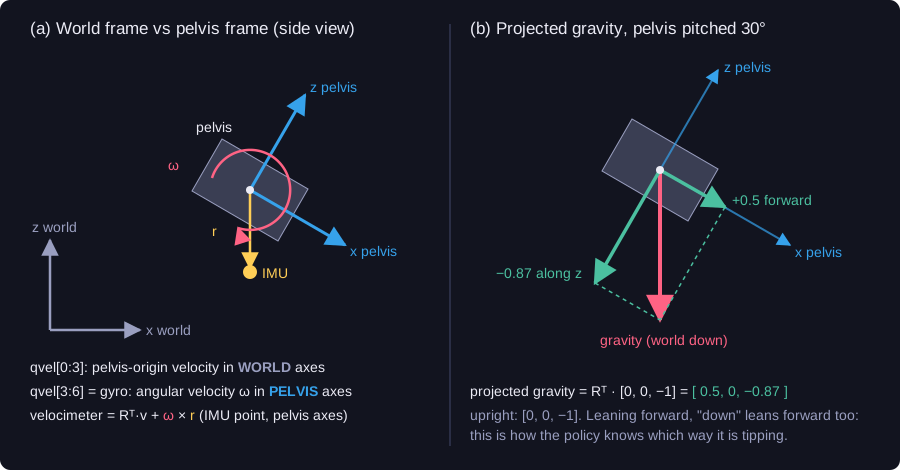
<p><img src="/humanoid-walking-lab/assets/images/week-2/frames.svg" alt="World frame vs pelvis frame, and projected gravity" /></p>

<p>The robot’s base is a free joint, and its velocity <code class="language-plaintext highlighter-rouge">qvel[0:6]</code> mixes two frames (panel a):</p>

<ul>
  <li><code class="language-plaintext highlighter-rouge">qvel[0:3]</code>, the <strong>linear</strong> velocity, uses <strong>world</strong> axes.</li>
  <li><code class="language-plaintext highlighter-rouge">qvel[3:6]</code>, the <strong>angular</strong> velocity, uses the <strong>pelvis’s own</strong> axes.</li>
</ul>

<p>The policy was trained on <strong>sensor</strong> readings, and both IMU sensors use the pelvis frame: “forward” is always the pelvis’s x axis, whichever way the robot faces. To check I understood them, I rebuilt both sensor readings from <code class="language-plaintext highlighter-rouge">qvel</code>:</p>

<ul>
  <li>The <strong>gyro</strong> equals <code class="language-plaintext highlighter-rouge">qvel[3:6]</code>. It’s already in the pelvis frame.</li>
  <li>The <strong>velocimeter</strong> needs two steps. First turn the world velocity into the pelvis frame (\(R^\top v\)). Then add \(\omega \times r\), because the IMU sits 9.5 cm from the pelvis centre, and on a turning body, points further out move faster.</li>
</ul>

<p>Both matched exactly. Leaving out \(\omega \times r\) gave an error of 0.03 m/s, which matters when the robot is asked to walk at 0.5 m/s.</p>

<p><strong>Projected gravity</strong> (panel b) is “down” from the robot’s point of view, \(R^\top [0, 0, -1]\). Standing upright it’s \([0, 0, -1]\). Leaning 30° forward it becomes \([0.5, 0, -0.87]\): down now points partly forward. That’s how the policy knows which way it is falling.</p>

<div class="language-python highlighter-rouge"><div class="highlight"><pre class="highlight"><code><span class="k">def</span> <span class="nf">projected_gravity</span><span class="p">(</span><span class="n">model</span><span class="p">,</span> <span class="n">data</span><span class="p">):</span>
    <span class="n">R</span> <span class="o">=</span> <span class="n">data</span><span class="p">.</span><span class="n">xmat</span><span class="p">[</span><span class="n">model</span><span class="p">.</span><span class="n">body</span><span class="p">(</span><span class="s">"pelvis"</span><span class="p">).</span><span class="nb">id</span><span class="p">].</span><span class="n">reshape</span><span class="p">(</span><span class="mi">3</span><span class="p">,</span> <span class="mi">3</span><span class="p">)</span>   <span class="c1"># pelvis frame -&gt; world
</span>    <span class="k">return</span> <span class="n">R</span><span class="p">.</span><span class="n">T</span> <span class="o">@</span> <span class="n">np</span><span class="p">.</span><span class="n">array</span><span class="p">([</span><span class="mf">0.0</span><span class="p">,</span> <span class="mf">0.0</span><span class="p">,</span> <span class="o">-</span><span class="mf">1.0</span><span class="p">])</span>                 <span class="c1"># world -&gt; pelvis frame
</span></code></pre></div></div>

<h3 id="a-5-ms-lag">A 5 ms lag</h3>

<p>One detail surprised me. <code class="language-plaintext highlighter-rouge">mj_step</code> computes the sensors first and then moves the simulation forward. So right after a step, the joint angles are new, but the IMU readings are still from <strong>before</strong> the step, 5 ms old. One call to <code class="language-plaintext highlighter-rouge">mj_forward</code> updates them.</p>

<p>During normal walking the difference is tiny, 0.004 rad/s. But when the robot hits the floor, its rotation changes sharply, and the old gyro reading was off by up to <strong>11 rad/s</strong>. Diego’s code uses the old values. The training framework updates them first (at least in the version I could read). On flat ground it barely changes the walk: 3.00 m against 3.08 m in 6 s.</p>

<h2 id="inside-the-network">Inside the network</h2>

<p>The trained policy is one file, <code class="language-plaintext highlighter-rouge">walk.onnx</code>. <strong>ONNX</strong> is a standard format for trained neural networks. It stores the steps of the computation and the learned weights, so you don’t need the framework that trained it. The policy was trained in PyTorch, but to run it I only need ONNX Runtime. Diego’s C++ ROS node uses the same file.</p>

<p>I wrote a small reader to see what’s inside:</p>

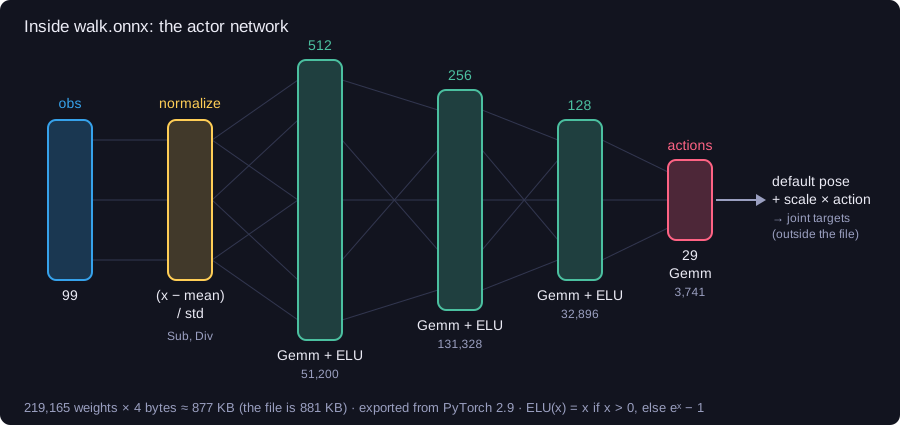
<p><img src="/humanoid-walking-lab/assets/images/week-2/network.svg" alt="The actor network inside walk.onnx" /></p>

<ul>
  <li><strong>A normalizer comes first.</strong> The network learned on scaled inputs, \((x - \text{mean}) / \text{std}\), and the mean and std from training are <strong>inside the file</strong>. So I give it the raw 99 numbers. Scaling them myself would scale them twice.</li>
  <li><strong>Then a simple MLP</strong>: \(99 \to 512 \to 256 \to 128 \to 29\). Each layer is a matrix multiply plus a bias (ONNX calls it <code class="language-plaintext highlighter-rouge">Gemm</code>), followed by <strong>ELU</strong>, which is like ReLU but smooth below zero.</li>
  <li><strong>About 219,000 weights.</strong> At 4 bytes each that’s 877 KB, and the file is 881 KB, so it’s almost all weights.</li>
  <li><strong>Only the actor.</strong> Training also used a second network, the critic, which judged how good each moment was. It’s not in the file, because running the policy doesn’t need it.</li>
</ul>

<p>The file also stores <strong>metadata</strong>: joint names, starting pose, gains, action scales and the observation order. Loading the policy and reading it takes a few lines, from <a href="https://github.com/SakshayMahna/humanoid-walking-lab/blob/main/exercises/05_walking/walk.py"><code class="language-plaintext highlighter-rouge">walk.py</code></a>:</p>

<div class="language-python highlighter-rouge"><div class="highlight"><pre class="highlight"><code><span class="n">session</span> <span class="o">=</span> <span class="n">ort</span><span class="p">.</span><span class="n">InferenceSession</span><span class="p">(</span><span class="s">"walk.onnx"</span><span class="p">,</span> <span class="n">providers</span><span class="o">=</span><span class="p">[</span><span class="s">"CPUExecutionProvider"</span><span class="p">])</span>
<span class="n">meta</span> <span class="o">=</span> <span class="n">session</span><span class="p">.</span><span class="n">get_modelmeta</span><span class="p">().</span><span class="n">custom_metadata_map</span>        <span class="c1"># name -&gt; comma-separated values
</span><span class="n">stiffness</span> <span class="o">=</span> <span class="p">[</span><span class="nb">float</span><span class="p">(</span><span class="n">v</span><span class="p">)</span> <span class="k">for</span> <span class="n">v</span> <span class="ow">in</span> <span class="n">meta</span><span class="p">[</span><span class="s">"joint_stiffness"</span><span class="p">].</span><span class="n">split</span><span class="p">(</span><span class="s">","</span><span class="p">)]</span>
</code></pre></div></div>

<p>I compared every entry with my model. All of them matched. That was the strongest check that my simulated robot is the one the policy was trained on.</p>

<h2 id="it-walks">It walks</h2>

<p>The policy runs every 20 ms, and the physics runs 4 times in between. Here is a simplified version of the controller in <a href="https://github.com/SakshayMahna/humanoid-walking-lab/blob/main/exercises/policy_utils.py"><code class="language-plaintext highlighter-rouge">policy_utils.py</code></a>, which is called before every physics step:</p>

<div class="language-python highlighter-rouge"><div class="highlight"><pre class="highlight"><code><span class="k">def</span> <span class="nf">control</span><span class="p">(</span><span class="n">model</span><span class="p">,</span> <span class="n">data</span><span class="p">):</span>
    <span class="k">if</span> <span class="n">step</span> <span class="o">%</span> <span class="mi">4</span> <span class="o">==</span> <span class="mi">0</span><span class="p">:</span>                                      <span class="c1"># every 4th physics step = 50 Hz
</span>        <span class="n">obs</span> <span class="o">=</span> <span class="n">make_observation</span><span class="p">(</span><span class="n">model</span><span class="p">,</span> <span class="n">data</span><span class="p">,</span> <span class="n">default_pos</span><span class="p">,</span> <span class="n">last_action</span><span class="p">,</span> <span class="n">command</span><span class="p">)</span>
        <span class="n">action</span> <span class="o">=</span> <span class="n">session</span><span class="p">.</span><span class="n">run</span><span class="p">(</span><span class="bp">None</span><span class="p">,</span> <span class="p">{</span><span class="s">"obs"</span><span class="p">:</span> <span class="n">obs</span><span class="p">[</span><span class="bp">None</span><span class="p">,</span> <span class="p">:]})[</span><span class="mi">0</span><span class="p">][</span><span class="mi">0</span><span class="p">]</span>     <span class="c1"># 99 numbers in, 29 out
</span>        <span class="n">target</span> <span class="o">=</span> <span class="n">default_pos</span> <span class="o">+</span> <span class="n">action_scale</span> <span class="o">*</span> <span class="n">action</span>                 <span class="c1"># joint angles, joint order
</span>        <span class="n">data</span><span class="p">.</span><span class="n">ctrl</span><span class="p">[:]</span> <span class="o">=</span> <span class="n">target</span><span class="p">[</span><span class="n">joint_index_of_actuator</span><span class="p">]</span>               <span class="c1"># reorder for the actuators
</span>        <span class="n">last_action</span> <span class="o">=</span> <span class="n">action</span>                                         <span class="c1"># fed back next time
</span>    <span class="n">step</span> <span class="o">+=</span> <span class="mi">1</span>
</code></pre></div></div>

<p>Two details mattered:</p>

<ul>
  <li>The policy gives joint angles in <strong>joint order</strong>, but MuJoCo’s actuators are in a different order (grouped by motor type). So the targets must be reordered.</li>
  <li>My first version was <strong>off by one</strong>. MuJoCo counts the robot’s free-floating base as joint 0, so a joint’s id is one more than its place in the policy’s list. A simple test caught it: a zero action must give exactly the starting pose.</li>
</ul>

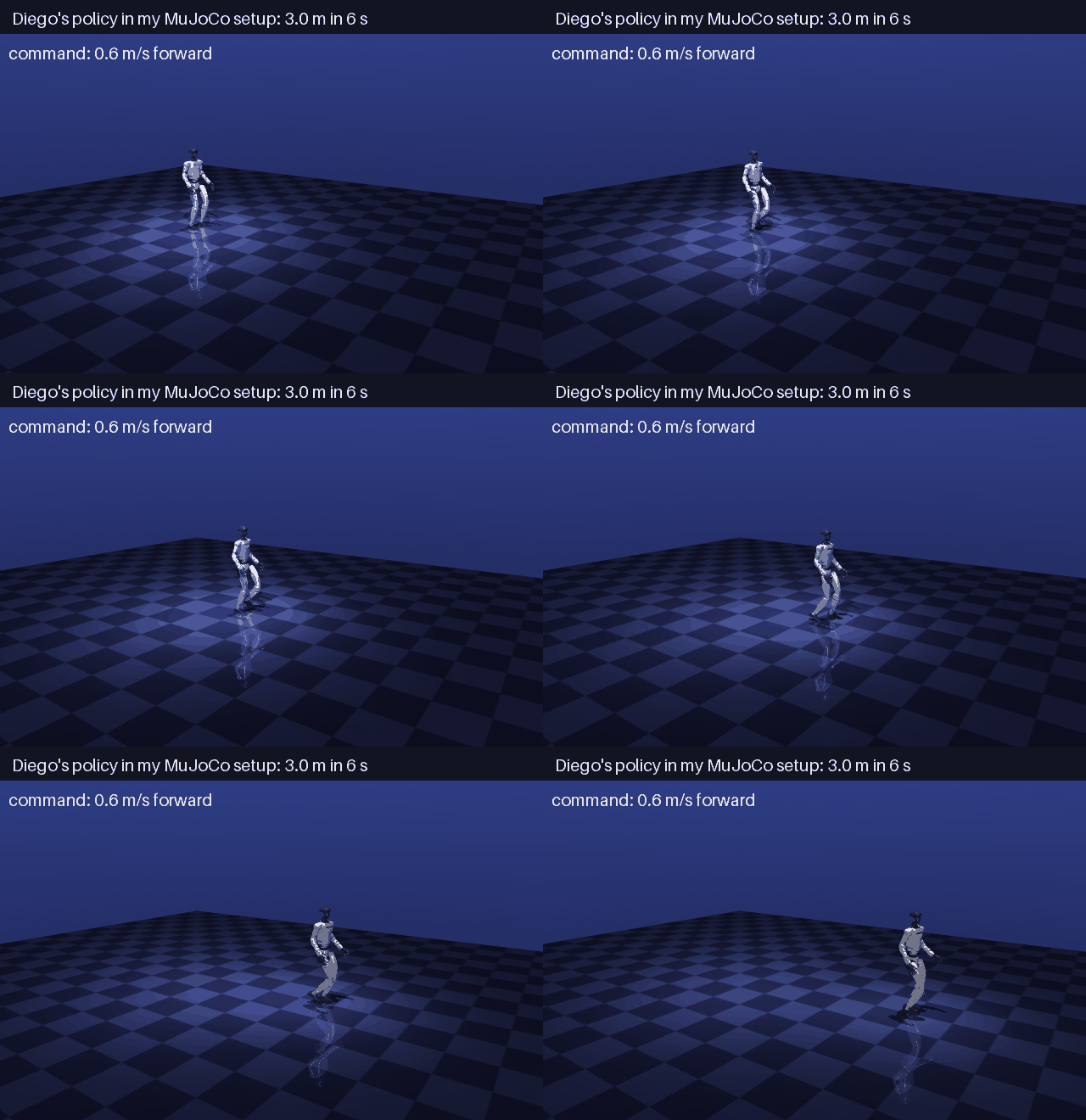
<p><img src="/humanoid-walking-lab/assets/images/week-2/walk_forward.gif" alt="Diego's policy walking in my MuJoCo setup" /></p>

<p>Asked to walk at 0.6 m/s, the robot walked <strong>3.0 m in 6 s</strong> without falling, including the time it takes to get going.</p>

<h2 id="the-dead-zone">The dead zone</h2>

<h3 id="testing-every-command">Testing every command</h3>

<p>Walking forward is just one test. I tried every kind of command: faster, slower, backward, sideways, turning. For each one I measured the <strong>steady speed</strong>, over the last 3 s of an 8 s run, once the robot had settled into its walk (<a href="https://github.com/SakshayMahna/humanoid-walking-lab/blob/main/exercises/06_validation/validate.py"><code class="language-plaintext highlighter-rouge">validate.py</code></a>):</p>

<table>
  <thead>
    <tr>
      <th>Command</th>
      <th>Speed reached</th>
    </tr>
  </thead>
  <tbody>
    <tr>
      <td>forward 0.2, 0.3 m/s</td>
      <td><strong>0.00</strong>: stands still</td>
    </tr>
    <tr>
      <td>forward 0.4 / 0.5 / 0.8 m/s</td>
      <td>0.30 / 0.43 / 0.76 m/s</td>
    </tr>
    <tr>
      <td>sideways 0.3 m/s</td>
      <td><strong>0.00</strong>: stands still</td>
    </tr>
    <tr>
      <td>sideways 0.5 m/s</td>
      <td>0.43 m/s</td>
    </tr>
    <tr>
      <td>turn on the spot, 0.3 to 0.8 rad/s</td>
      <td><strong>0.05 rad/s at most</strong></td>
    </tr>
    <tr>
      <td>walk 0.5 m/s while turning 0.5 rad/s</td>
      <td>turns at 0.47 rad/s</td>
    </tr>
  </tbody>
</table>

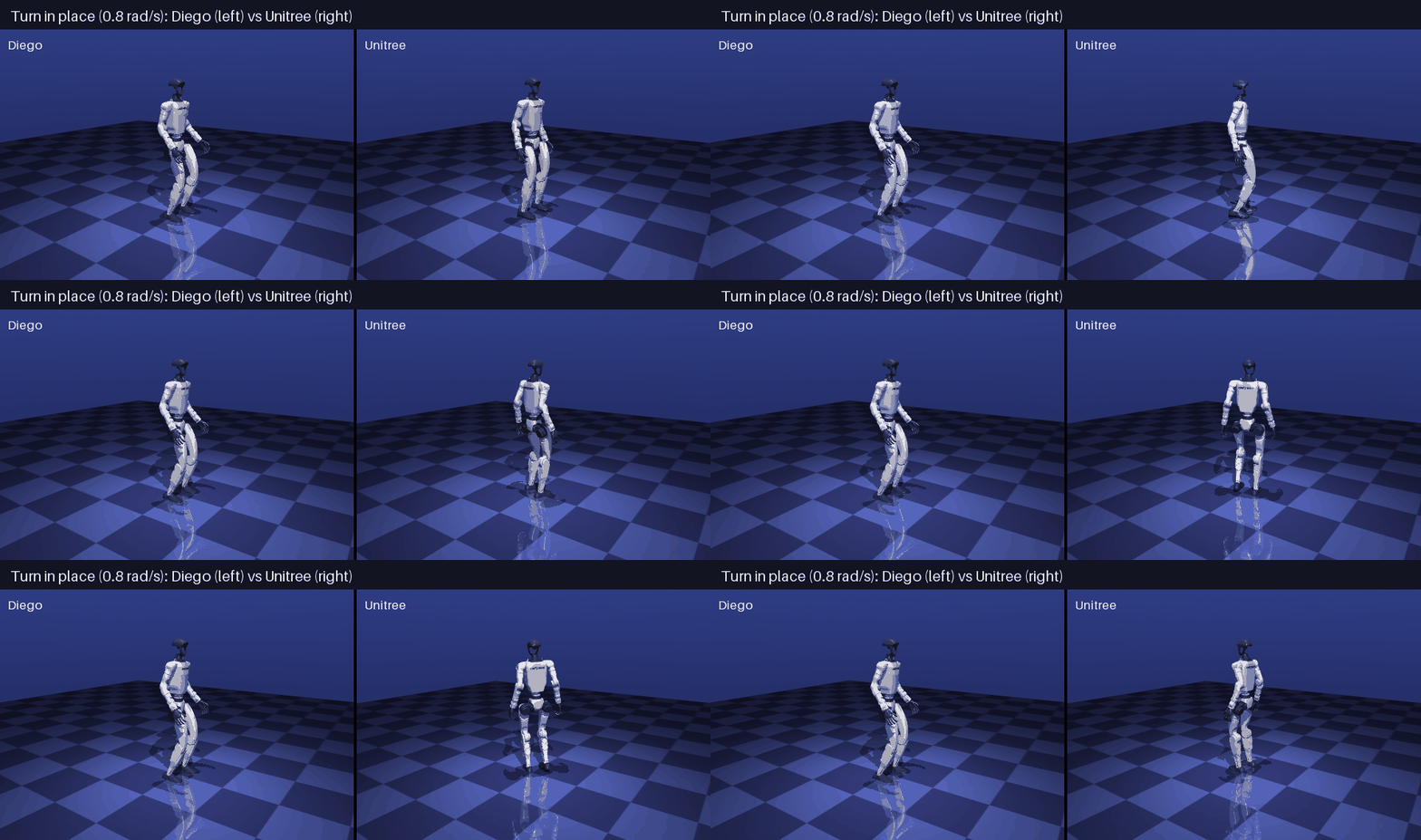
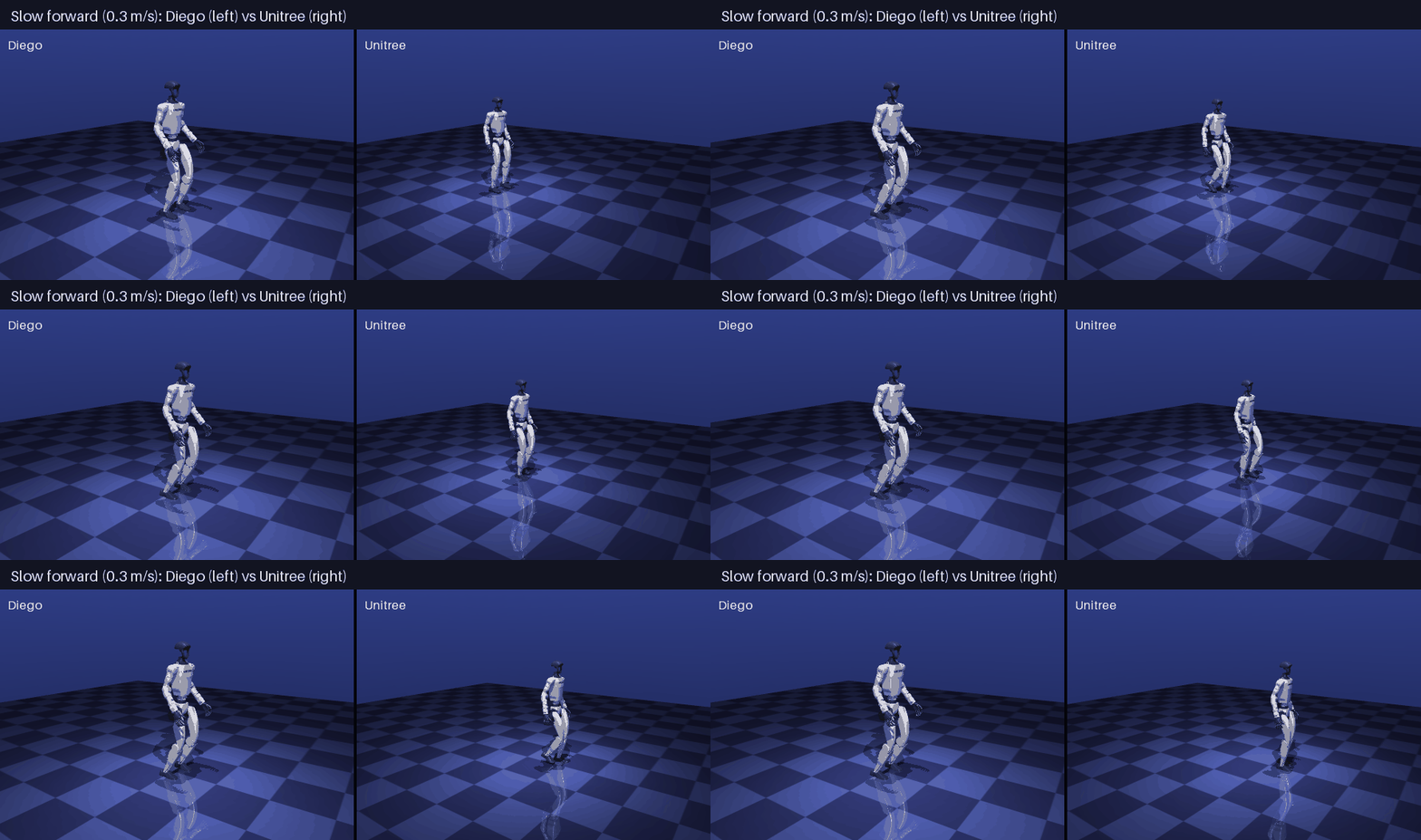
<p>Normal walking works well. But below about 0.3 m/s the robot just stands, and it won’t turn on the spot at all, only while walking. A <strong>dead zone</strong>.</p>

<h3 id="ruling-out-my-own-mistakes">Ruling out my own mistakes</h3>

<p>My first thought was that I had done something wrong. So I checked the differences I knew about:</p>

<ul>
  <li><strong>Sensor timing:</strong> old or updated IMU readings (the 5 ms lag) give the same dead zone.</li>
  <li><strong>Integrator:</strong> Euler (as in Diego’s code) or implicitfast (the training default) give the same dead zone.</li>
  <li><strong>Command code:</strong> the training framework doesn’t cut off small commands.</li>
</ul>

<p>The dead zone stayed every time. Diego’s blog doesn’t mention it. It seemed to come from the policy itself.</p>

<h3 id="a-second-policy">A second policy</h3>

<p>Unitree publishes its own walking policy for the G1, trained with the same framework. It takes 98 numbers instead of 99. It leaves out the linear velocity, which a real robot can’t measure directly, and it adds <strong>two</strong> numbers that Diego’s policy doesn’t have: a <strong>gait phase</strong>. I gave it its own robot model and starting pose, checked its file the same way, and ran the same tests (<a href="https://github.com/SakshayMahna/humanoid-walking-lab/blob/main/exercises/07_unitree/unitree.py"><code class="language-plaintext highlighter-rouge">unitree.py</code></a>):</p>

<table>
  <thead>
    <tr>
      <th>Command</th>
      <th>Diego</th>
      <th>Unitree</th>
    </tr>
  </thead>
  <tbody>
    <tr>
      <td>forward 0.2 / 0.3 m/s</td>
      <td>0.00 / 0.00</td>
      <td><strong>0.22 / 0.31</strong> m/s</td>
    </tr>
    <tr>
      <td>forward 0.5 / 0.8 m/s</td>
      <td>0.43 / 0.76</td>
      <td><strong>0.50 / 0.80</strong> m/s</td>
    </tr>
    <tr>
      <td>sideways 0.3 m/s</td>
      <td>0.00</td>
      <td><strong>0.24</strong> m/s</td>
    </tr>
    <tr>
      <td>turn on the spot 0.3 / 0.5 / 0.8 rad/s</td>
      <td>0.01 / 0.01 / 0.05</td>
      <td><strong>0.34 / 0.53 / 0.81</strong> rad/s</td>
    </tr>
  </tbody>
</table>

<p><strong>No dead zone.</strong> Unitree’s policy walks slowly, steps sideways and turns on the spot, almost exactly as asked.</p>

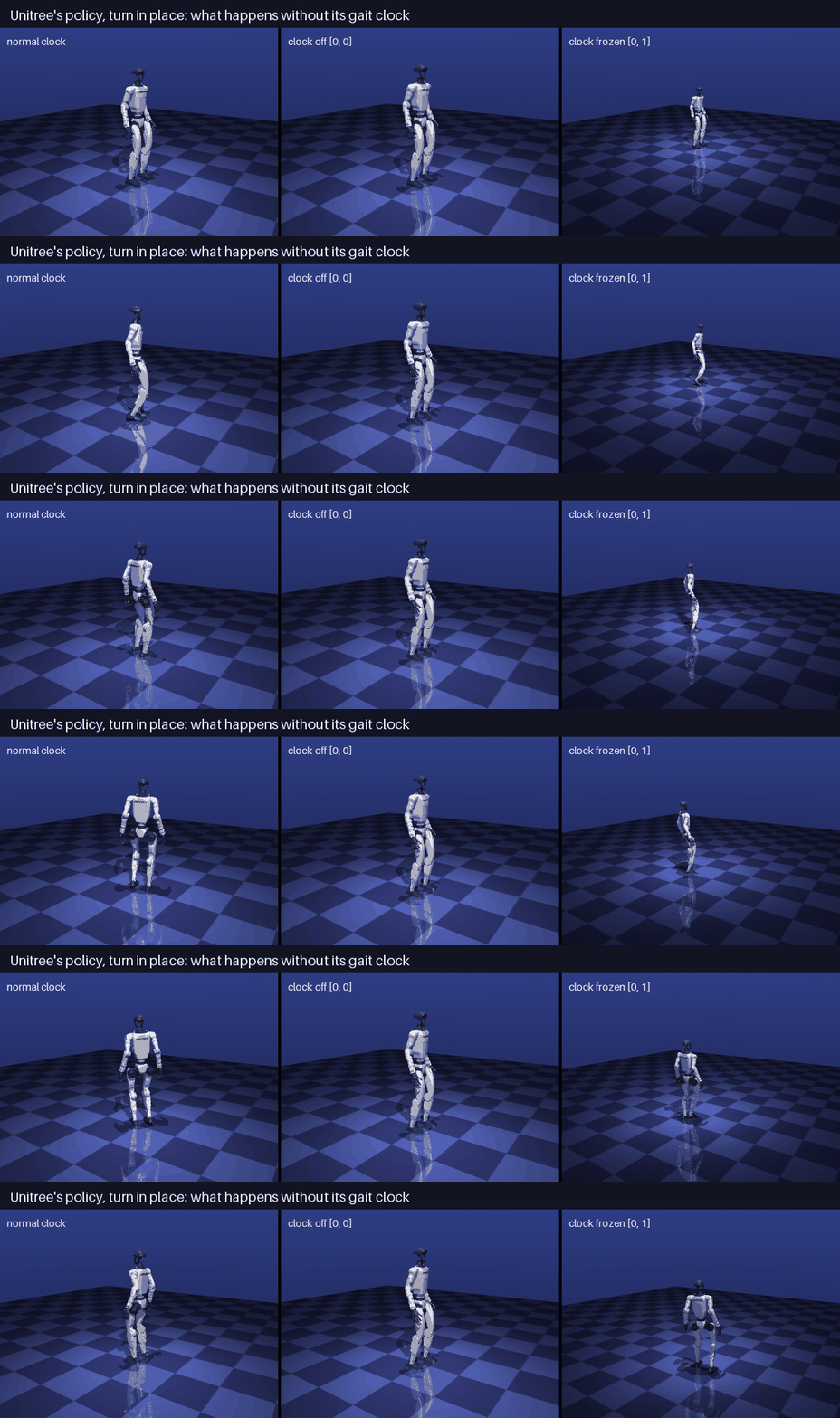
<p><img src="/humanoid-walking-lab/assets/images/week-2/deadzone_turn.gif" alt="Turning on the spot: Diego's policy vs Unitree's" /></p>

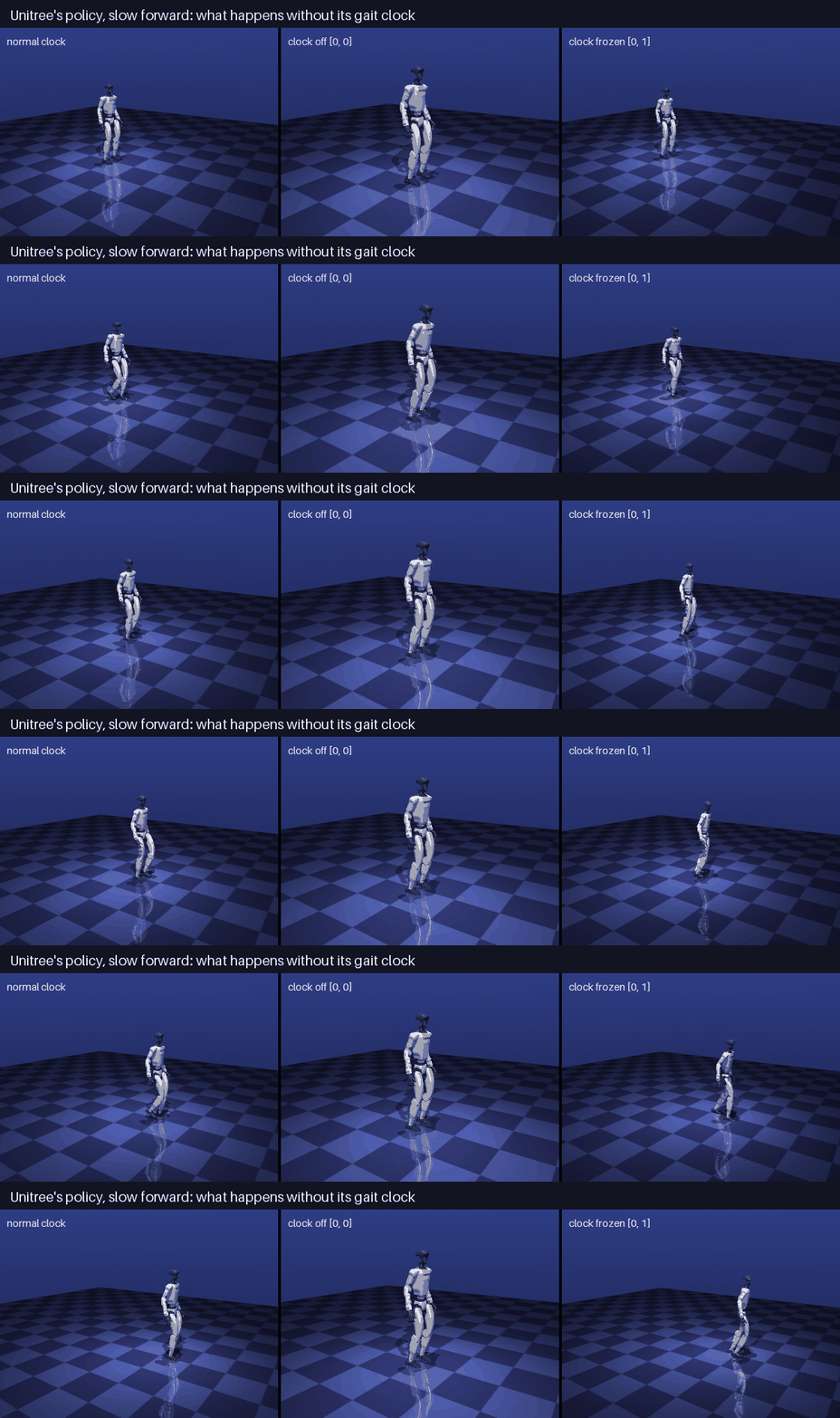
<p><img src="/humanoid-walking-lab/assets/images/week-2/deadzone_slow_forward.gif" alt="Walking slowly: Diego's policy vs Unitree's" /></p>

<h3 id="the-gait-clock">The gait clock</h3>

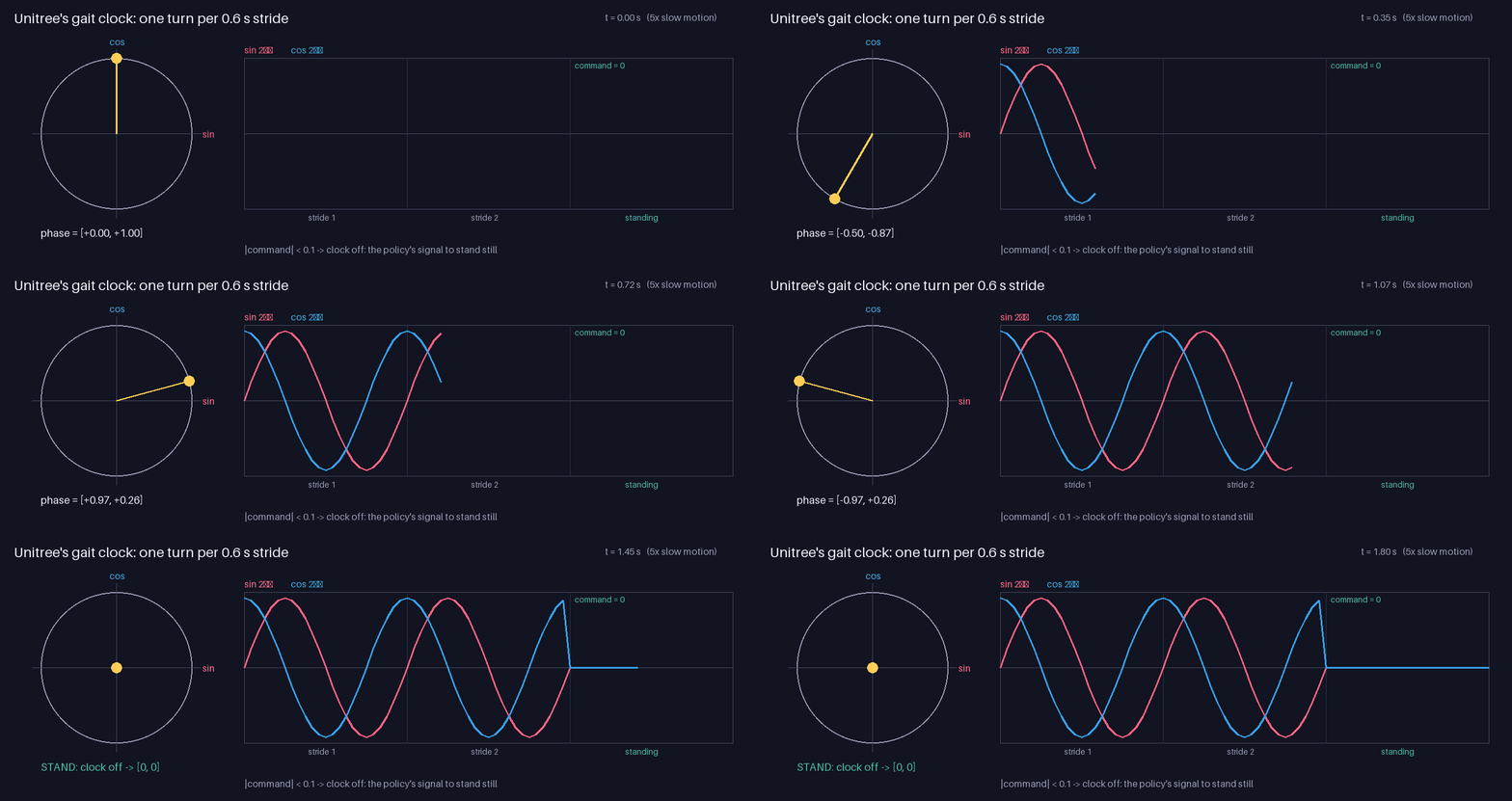
<p>The <strong>gait phase</strong> is a clock that goes round once per step cycle, every 0.6 s. A single number from 0 to 1 would jump back to 0 at the end of every cycle, so instead it’s given as a point on a circle:</p>

\[\phi = \frac{t \bmod 0.6}{0.6}, \qquad \text{phase} = [\sin 2\pi\phi,\; \cos 2\pi\phi]\]

<p>When the command is almost zero, the clock is turned off and reads \([0, 0]\). That’s the policy’s signal to stand still. In code, from <a href="https://github.com/SakshayMahna/humanoid-walking-lab/blob/main/exercises/unitree_utils.py"><code class="language-plaintext highlighter-rouge">unitree_utils.py</code></a>:</p>

<div class="language-python highlighter-rouge"><div class="highlight"><pre class="highlight"><code><span class="k">def</span> <span class="nf">gait_phase</span><span class="p">(</span><span class="n">t</span><span class="p">,</span> <span class="n">command</span><span class="p">,</span> <span class="n">period</span><span class="o">=</span><span class="mf">0.6</span><span class="p">):</span>
    <span class="n">phi</span> <span class="o">=</span> <span class="p">(</span><span class="n">t</span> <span class="o">%</span> <span class="n">period</span><span class="p">)</span> <span class="o">/</span> <span class="n">period</span>
    <span class="n">phase</span> <span class="o">=</span> <span class="n">np</span><span class="p">.</span><span class="n">array</span><span class="p">([</span><span class="n">np</span><span class="p">.</span><span class="n">sin</span><span class="p">(</span><span class="mi">2</span> <span class="o">*</span> <span class="n">np</span><span class="p">.</span><span class="n">pi</span> <span class="o">*</span> <span class="n">phi</span><span class="p">),</span> <span class="n">np</span><span class="p">.</span><span class="n">cos</span><span class="p">(</span><span class="mi">2</span> <span class="o">*</span> <span class="n">np</span><span class="p">.</span><span class="n">pi</span> <span class="o">*</span> <span class="n">phi</span><span class="p">)])</span>
    <span class="k">if</span> <span class="n">np</span><span class="p">.</span><span class="n">linalg</span><span class="p">.</span><span class="n">norm</span><span class="p">(</span><span class="n">command</span><span class="p">)</span> <span class="o">&lt;</span> <span class="mf">0.1</span><span class="p">:</span>      <span class="c1"># standing still: clock off
</span>        <span class="n">phase</span> <span class="o">=</span> <span class="n">np</span><span class="p">.</span><span class="n">zeros</span><span class="p">(</span><span class="mi">2</span><span class="p">)</span>
    <span class="k">return</span> <span class="n">phase</span>
</code></pre></div></div>

<p><img src="/humanoid-walking-lab/assets/images/week-2/gait_phase.gif" alt="The gait clock: one turn per step cycle, off when standing" /></p>

<p>This gave me an idea. A turn-on-the-spot command is \([0, 0, 0.8]\). Its size is 0.8, so Unitree’s clock keeps <strong>ticking</strong>, which tells the policy to keep stepping. Diego’s policy has no clock. It has to decide from the command alone whether to step, and maybe it only learned to step when the command is large.</p>

<h3 id="the-experiment">The experiment</h3>

<p>To test this idea, I changed only the clock and kept everything else the same: same robot, same policy, same commands. I tried three versions of Unitree’s policy:</p>

<div class="language-python highlighter-rouge"><div class="highlight"><pre class="highlight"><code><span class="k">def</span> <span class="nf">with_phase</span><span class="p">(</span><span class="n">value</span><span class="p">):</span>
    <span class="k">def</span> <span class="nf">obs_fn</span><span class="p">(</span><span class="n">model</span><span class="p">,</span> <span class="n">data</span><span class="p">,</span> <span class="n">default_pos</span><span class="p">,</span> <span class="n">last_action</span><span class="p">,</span> <span class="n">command</span><span class="p">):</span>
        <span class="n">obs</span> <span class="o">=</span> <span class="n">make_unitree_observation</span><span class="p">(</span><span class="n">model</span><span class="p">,</span> <span class="n">data</span><span class="p">,</span> <span class="n">default_pos</span><span class="p">,</span> <span class="n">last_action</span><span class="p">,</span> <span class="n">command</span><span class="p">)</span>
        <span class="n">obs</span><span class="p">[</span><span class="mi">9</span><span class="p">:</span><span class="mi">11</span><span class="p">]</span> <span class="o">=</span> <span class="n">value</span>                  <span class="c1"># replace the gait clock
</span>        <span class="k">return</span> <span class="n">obs</span>
    <span class="k">return</span> <span class="n">obs_fn</span>

<span class="c1"># normal clock | clock off: with_phase([0, 0]) | clock frozen: with_phase([0, 1])
</span></code></pre></div></div>

<table>
  <thead>
    <tr>
      <th>Command</th>
      <th>Normal clock</th>
      <th>Clock off, \([0, 0]\)</th>
      <th>Clock frozen at \([0, 1]\)</th>
    </tr>
  </thead>
  <tbody>
    <tr>
      <td>turn on the spot 0.8 rad/s</td>
      <td><strong>0.81 rad/s</strong></td>
      <td><strong>0.02 rad/s</strong></td>
      <td>falls</td>
    </tr>
    <tr>
      <td>forward 0.3 m/s</td>
      <td><strong>0.31 m/s</strong></td>
      <td><strong>0.00 m/s</strong></td>
      <td>0.48 m/s, too fast</td>
    </tr>
    <tr>
      <td>sideways 0.3 m/s</td>
      <td><strong>0.24 m/s</strong></td>
      <td><strong>0.00 m/s</strong></td>
      <td>0.17 m/s, unsteady</td>
    </tr>
    <tr>
      <td>forward 0.6 m/s</td>
      <td>0.60 m/s</td>
      <td><strong>0.54 m/s</strong></td>
      <td>0.73 m/s</td>
    </tr>
  </tbody>
</table>

<p><img src="/humanoid-walking-lab/assets/images/week-2/clock_turn.gif" alt="Turning on the spot with the gait clock normal, off and frozen" /></p>

<p><img src="/humanoid-walking-lab/assets/images/week-2/clock_slow_forward.gif" alt="Walking slowly with the gait clock normal, off and frozen" /></p>

<p>With its clock turned off, <strong>Unitree’s policy behaves like Diego’s</strong>: it stands still for slow commands, won’t turn on the spot, and still walks at 0.6 m/s. With the clock frozen, it loses its rhythm, goes too fast, and falls when it tries to turn. So the clock has to <em>tick</em>, not just be there.</p>

<h3 id="what-i-can-and-cant-say">What I can and can’t say</h3>

<p>For Unitree’s policy the answer is clear: <strong>the ticking gait clock is what makes it step for small commands</strong>. For bigger commands, the command alone is enough.</p>

<p>For Diego’s policy the evidence is strong but indirect. It has no clock, and it behaves like Unitree’s policy without its clock. That’s my best explanation for its dead zone. But it isn’t proof: the two policies were trained with different settings, and Diego’s training settings aren’t available.</p>

<h2 id="next">Next</h2>

<ul>
  <li><strong>ROS 2 and Gazebo.</strong> Diego’s project runs the policy in Gazebo, a different simulator, through a ROS 2 node. I’ll set that up (in Docker on my Mac) and see how much of the behavior carries over.</li>
  <li><strong>Which policy is better?</strong> “It walks” isn’t a measurement. I want proper numbers to compare the two policies: how well they follow commands, how much they drift, how much effort they use, and how they handle pushes and different floors.</li>
</ul>]]></content><author><name></name></author><category term="blog" /><summary type="html"><![CDATA[Building the Unitree G1 in MuJoCo, running a trained walking policy, and finding out why it could not turn on the spot.]]></summary></entry><entry><title type="html">Week 1 — What a Pendulum Taught Me About Humanoid Control</title><link href="https://sakshaymahna.github.io/humanoid-walking-lab/blog/2026/10/10/week-1.html" rel="alternate" type="text/html" title="Week 1 — What a Pendulum Taught Me About Humanoid Control" /><published>2026-10-10T00:00:00+05:30</published><updated>2026-10-10T00:00:00+05:30</updated><id>https://sakshaymahna.github.io/humanoid-walking-lab/blog/2026/10/10/week-1</id><content type="html" xml:base="https://sakshaymahna.github.io/humanoid-walking-lab/blog/2026/10/10/week-1.html"><![CDATA[<h2 id="why-im-doing-this">Why I’m doing this</h2>

<p>I’m working on a research project with <a href="https://jderobot.github.io/">JdeRobot</a> around humanoid locomotion: making it easier to give humanoid robots useful movement skills. Before building anything on top of a walking robot, I want to understand how a learned walking policy actually works. A neural network reads some sensor values, outputs some numbers, and a robot with almost 30 joints walks. What happens in between? The physics simulation, the robot state, the observations, the actions and the control.</p>

<p>I’m learning this by rebuilding an existing project piece by piece. My reference is <a href="https://github.com/RoboticsLabURJC/2025-tfg-diego-lopez">Diego López’s thesis project</a> from Robotics Lab URJC. It runs a walking policy for the <strong>Unitree G1</strong> humanoid, trained with <a href="https://github.com/mujocolab/mjlab">mjlab</a> on the <a href="https://mujoco.org">MuJoCo</a> physics simulator. My first goal is to make the G1 walk in plain MuJoCo with that trained policy, and to understand every part of it.</p>

<p>This week was about MuJoCo itself. All the code is in the <a href="https://github.com/SakshayMahna/humanoid-walking-lab/tree/main/exercises"><code class="language-plaintext highlighter-rouge">exercises/</code></a> folder of the project repository.</p>

<h2 id="opening-up-the-g1">Opening up the G1</h2>

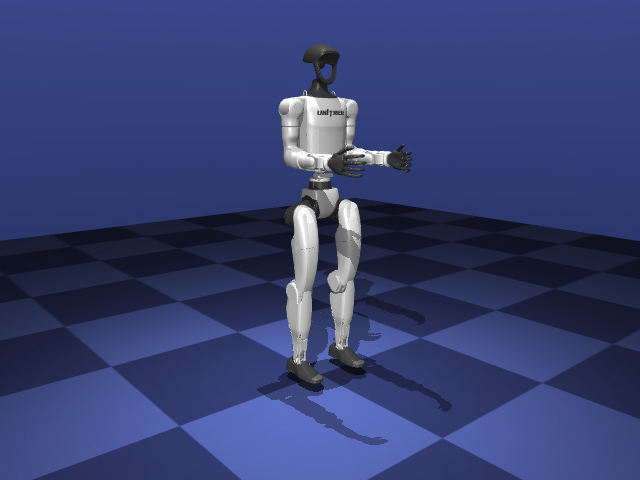
<p><img src="/humanoid-walking-lab/assets/images/week-1/g1.png" alt="The Unitree G1 humanoid in MuJoCo" /></p>

<p>I started by loading the robot and looking at what’s inside. MuJoCo splits a simulation into two objects:</p>

<ul>
  <li><strong><code class="language-plaintext highlighter-rouge">MjModel</code></strong> holds everything that stays fixed: bodies, joints, masses, sensors, the timestep.</li>
  <li><strong><code class="language-plaintext highlighter-rouge">MjData</code></strong> holds everything that changes: joint positions and velocities, sensor readings, time.</li>
</ul>

<div class="language-python highlighter-rouge"><div class="highlight"><pre class="highlight"><code><span class="n">model</span> <span class="o">=</span> <span class="n">mujoco</span><span class="p">.</span><span class="n">MjModel</span><span class="p">.</span><span class="n">from_xml_path</span><span class="p">(</span><span class="s">"robot/g1.xml"</span><span class="p">)</span>
<span class="n">data</span> <span class="o">=</span> <span class="n">mujoco</span><span class="p">.</span><span class="n">MjData</span><span class="p">(</span><span class="n">model</span><span class="p">)</span>

<span class="n">joint</span> <span class="o">=</span> <span class="n">model</span><span class="p">.</span><span class="n">joint</span><span class="p">(</span><span class="mi">1</span><span class="p">)</span>                          <span class="c1"># look up joints by index or name
</span><span class="k">print</span><span class="p">(</span><span class="n">joint</span><span class="p">.</span><span class="n">name</span><span class="p">,</span> <span class="n">joint</span><span class="p">.</span><span class="n">qposadr</span><span class="p">,</span> <span class="n">joint</span><span class="p">.</span><span class="n">dofadr</span><span class="p">)</span>  <span class="c1"># left_hip_pitch_joint [7] [6]
</span></code></pre></div></div>

<p>The full inspection script is <a href="https://github.com/SakshayMahna/humanoid-walking-lab/blob/main/exercises/01_inspect_model/inspect_model.py"><code class="language-plaintext highlighter-rouge">inspect_model.py</code></a>.</p>

<p>For the G1:</p>

<table>
  <thead>
    <tr>
      <th>Quantity</th>
      <th>Value</th>
      <th>Meaning</th>
    </tr>
  </thead>
  <tbody>
    <tr>
      <td><code class="language-plaintext highlighter-rouge">nq</code></td>
      <td>36</td>
      <td>numbers in <code class="language-plaintext highlighter-rouge">qpos</code> (positions)</td>
    </tr>
    <tr>
      <td><code class="language-plaintext highlighter-rouge">nv</code></td>
      <td>35</td>
      <td>numbers in <code class="language-plaintext highlighter-rouge">qvel</code> (velocities)</td>
    </tr>
    <tr>
      <td><code class="language-plaintext highlighter-rouge">nu</code></td>
      <td>0</td>
      <td>actuators (motors)</td>
    </tr>
    <tr>
      <td>joints</td>
      <td>30</td>
      <td>1 free joint + 29 hinges</td>
    </tr>
    <tr>
      <td>sensors</td>
      <td>4</td>
      <td>gyro, velocimeter, accelerometer, angular momentum</td>
    </tr>
  </tbody>
</table>

<p>A few of these numbers needed explaining. <code class="language-plaintext highlighter-rouge">nq</code> and <code class="language-plaintext highlighter-rouge">nv</code> differ because the robot’s base is a <em>free joint</em> that can move and rotate in any direction. Its position takes 7 numbers (x, y, z and a 4-number quaternion), but its velocity only needs 6 (3 linear, 3 angular). So the first hinge joint lives at <code class="language-plaintext highlighter-rouge">qpos[7]</code> but at <code class="language-plaintext highlighter-rouge">qvel[6]</code>, and the reference code has constants for exactly that offset. The quaternion is stored as <code class="language-plaintext highlighter-rouge">(w, x, y, z)</code>, while SciPy expects <code class="language-plaintext highlighter-rouge">(x, y, z, w)</code>; mixing them up gives no error, only wrong rotations. And <code class="language-plaintext highlighter-rouge">nu = 0</code> means the file has no motors at all. Without actuators, the robot is a ragdoll.</p>

<h3 id="free-fall-and-the-integrator">Free fall and the integrator</h3>

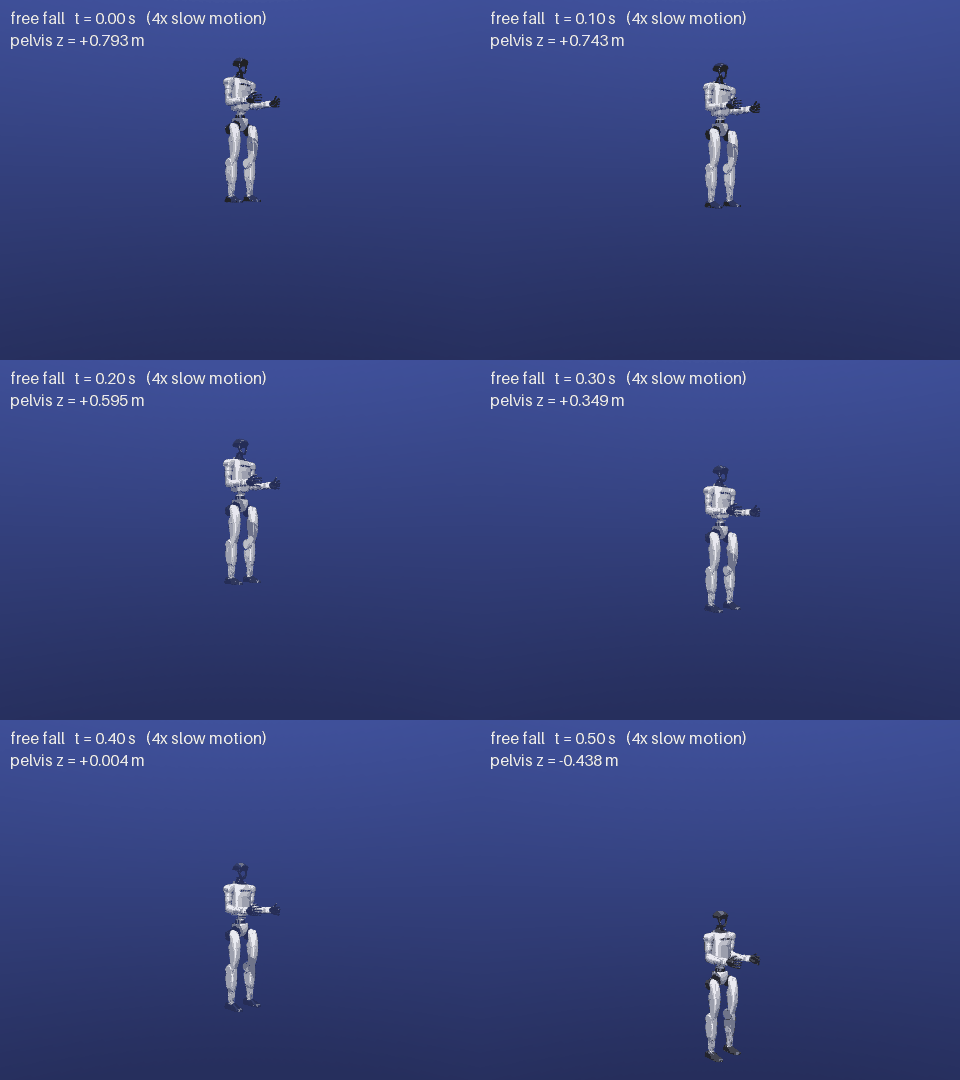
<p>The model has no floor, so stepping the simulation makes the robot fall. That makes a nice first test. After time \(t\), the height should be:</p>

\[z(t) = z_0 - \tfrac{1}{2} g t^2\]

<p><img src="/humanoid-walking-lab/assets/images/week-1/free_fall.gif" alt="G1 in free fall" /></p>

<p>The test itself is only a few lines:</p>

<div class="language-python highlighter-rouge"><div class="highlight"><pre class="highlight"><code><span class="n">mujoco</span><span class="p">.</span><span class="n">mj_resetData</span><span class="p">(</span><span class="n">model</span><span class="p">,</span> <span class="n">data</span><span class="p">)</span>
<span class="n">z0</span> <span class="o">=</span> <span class="n">data</span><span class="p">.</span><span class="n">qpos</span><span class="p">[</span><span class="mi">2</span><span class="p">]</span>                      <span class="c1"># pelvis height
</span><span class="k">while</span> <span class="n">data</span><span class="p">.</span><span class="n">time</span> <span class="o">&lt;</span> <span class="mf">0.5</span><span class="p">:</span>
    <span class="n">mujoco</span><span class="p">.</span><span class="n">mj_step</span><span class="p">(</span><span class="n">model</span><span class="p">,</span> <span class="n">data</span><span class="p">)</span>

<span class="n">t</span> <span class="o">=</span> <span class="n">data</span><span class="p">.</span><span class="n">time</span>
<span class="n">z_expected</span> <span class="o">=</span> <span class="n">z0</span> <span class="o">+</span> <span class="mf">0.5</span> <span class="o">*</span> <span class="n">model</span><span class="p">.</span><span class="n">opt</span><span class="p">.</span><span class="n">gravity</span><span class="p">[</span><span class="mi">2</span><span class="p">]</span> <span class="o">*</span> <span class="n">t</span><span class="o">**</span><span class="mi">2</span>   <span class="c1"># gravity[2] is -9.81
</span><span class="n">error</span> <span class="o">=</span> <span class="nb">abs</span><span class="p">(</span><span class="n">data</span><span class="p">.</span><span class="n">qpos</span><span class="p">[</span><span class="mi">2</span><span class="p">]</span> <span class="o">-</span> <span class="n">z_expected</span><span class="p">)</span>
</code></pre></div></div>

<p>After 0.5 s the formula gives −0.4333 m, and MuJoCo gave −0.4382 m. The simulated robot fell 4.9 mm further than physics says it should.</p>

<p>The difference comes from how MuJoCo moves through time. Its default integrator, <em>semi-implicit Euler</em>, first updates the velocity and then moves the position using that <strong>new</strong> velocity:</p>

\[v_{n+1} = v_n + g\,\Delta t, \qquad z_{n+1} = z_n + v_{n+1}\,\Delta t\]

<p>Since the robot is speeding up, the end-of-step velocity is the fastest one within that step, so every step moves slightly too far. Summing over all the steps gives the error exactly:</p>

\[z_n - z_0 = g\,\Delta t^2\,(1 + 2 + \dots + n) = \tfrac{1}{2} g t^2 + \tfrac{1}{2} g\,\Delta t\, t\]

\[\text{error} = \tfrac{1}{2}\, g\, \Delta t\, t = \tfrac{1}{2} \times 9.81 \times 0.002 \times 0.5 \approx 4.9\ \text{mm}\]

<p>The error is proportional to \(\Delta t\), and halving the timestep did halve it, to 2.45 mm. It’s a small number, but it showed me that the simulator is an approximation with rules I can predict.</p>

<h2 id="one-joint-at-a-time-the-pendulum">One joint at a time: the pendulum</h2>

<p>Before giving 29 joints their motors, I wanted to understand a single joint completely. So I wrote a pendulum in MuJoCo’s XML format: one hinge joint, a massless rod of length \(L = 0.5\) m, and a 1 kg ball at the end. The timestep is 0.005 s, the same one the G1 policy uses.</p>

<div class="language-xml highlighter-rouge"><div class="highlight"><pre class="highlight"><code><span class="nt">&lt;mujoco&gt;</span>
  <span class="nt">&lt;option</span> <span class="na">timestep=</span><span class="s">"0.005"</span><span class="nt">/&gt;</span>
  <span class="nt">&lt;worldbody&gt;</span>
    <span class="nt">&lt;body</span> <span class="na">name=</span><span class="s">"pole"</span><span class="nt">&gt;</span>
      <span class="nt">&lt;joint</span> <span class="na">name=</span><span class="s">"hinge"</span> <span class="na">type=</span><span class="s">"hinge"</span> <span class="na">axis=</span><span class="s">"0 1 0"</span><span class="nt">/&gt;</span>
      <span class="nt">&lt;geom</span> <span class="na">type=</span><span class="s">"capsule"</span> <span class="na">fromto=</span><span class="s">"0 0 0 0 0 -0.5"</span> <span class="na">size=</span><span class="s">"0.01"</span> <span class="na">density=</span><span class="s">"0"</span><span class="nt">/&gt;</span>  <span class="c">&lt;!-- massless rod --&gt;</span>
      <span class="nt">&lt;geom</span> <span class="na">type=</span><span class="s">"sphere"</span> <span class="na">pos=</span><span class="s">"0 0 -0.5"</span> <span class="na">size=</span><span class="s">"0.05"</span> <span class="na">mass=</span><span class="s">"1"</span><span class="nt">/&gt;</span>              <span class="c">&lt;!-- 1 kg ball --&gt;</span>
    <span class="nt">&lt;/body&gt;</span>
  <span class="nt">&lt;/worldbody&gt;</span>
  <span class="nt">&lt;actuator&gt;</span> <span class="c">&lt;!-- motors go here --&gt;</span> <span class="nt">&lt;/actuator&gt;</span>
<span class="nt">&lt;/mujoco&gt;</span>
</code></pre></div></div>

<p>The model is generated by a small function in <a href="https://github.com/SakshayMahna/humanoid-walking-lab/blob/main/exercises/02_pendulum_pd/pendulum.py"><code class="language-plaintext highlighter-rouge">pendulum.py</code></a>, so the later experiments can swap in different actuators.</p>

<h3 id="how-long-is-one-swing">How long is one swing?</h3>

<p>For small swings, a pendulum’s period is:</p>

\[T_0 = 2\pi \sqrt{\frac{L}{g}} = 1.4185\ \text{s}\]

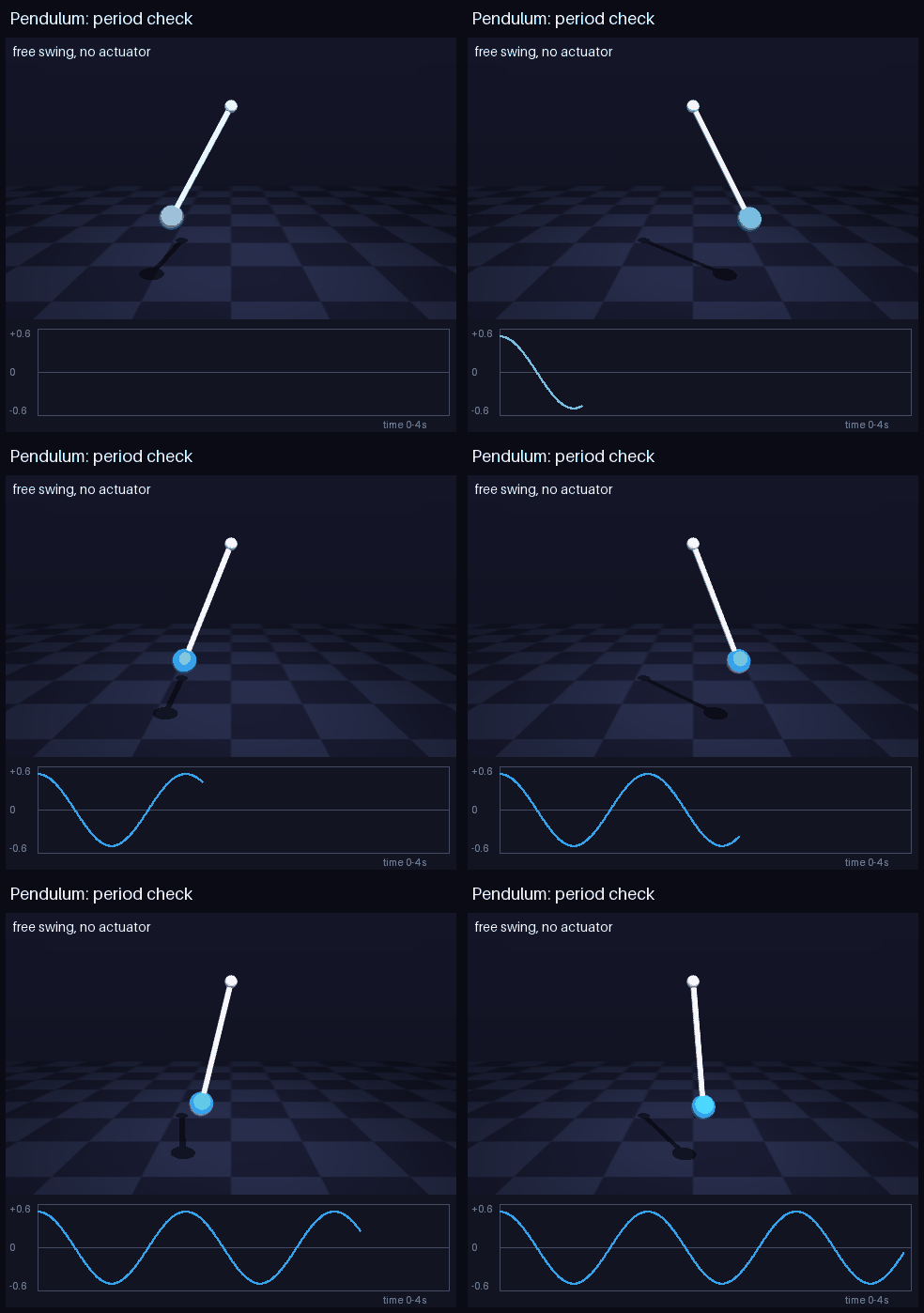
<p><img src="/humanoid-walking-lab/assets/images/week-1/pendulum_swing.gif" alt="A free-swinging pendulum" /></p>

<p>Starting from 0.1 rad, I measured the period by timing when the pendulum crossed zero:</p>

<div class="language-python highlighter-rouge"><div class="highlight"><pre class="highlight"><code><span class="n">zero_crossings</span> <span class="o">=</span> <span class="p">[]</span>
<span class="k">while</span> <span class="n">data</span><span class="p">.</span><span class="n">time</span> <span class="o">&lt;</span> <span class="mf">5.0</span><span class="p">:</span>
    <span class="n">q_prev</span> <span class="o">=</span> <span class="n">data</span><span class="p">.</span><span class="n">qpos</span><span class="p">[</span><span class="mi">0</span><span class="p">]</span>
    <span class="n">mujoco</span><span class="p">.</span><span class="n">mj_step</span><span class="p">(</span><span class="n">model</span><span class="p">,</span> <span class="n">data</span><span class="p">)</span>
    <span class="k">if</span> <span class="n">q_prev</span> <span class="o">&gt;</span> <span class="mi">0</span> <span class="ow">and</span> <span class="n">data</span><span class="p">.</span><span class="n">qpos</span><span class="p">[</span><span class="mi">0</span><span class="p">]</span> <span class="o">&lt;</span> <span class="mi">0</span><span class="p">:</span>     <span class="c1"># crossed zero going down: one per swing
</span>        <span class="n">zero_crossings</span><span class="p">.</span><span class="n">append</span><span class="p">(</span><span class="n">data</span><span class="p">.</span><span class="n">time</span><span class="p">)</span>

<span class="n">measured_period</span> <span class="o">=</span> <span class="n">np</span><span class="p">.</span><span class="n">diff</span><span class="p">(</span><span class="n">zero_crossings</span><span class="p">).</span><span class="n">mean</span><span class="p">()</span>
</code></pre></div></div>

<p>It came out at 1.4217 s, about 0.22% longer. That gap can be predicted almost exactly: the ball’s size adds 0.20%, the finite swing adds 0.06%, and timing on a 5 ms grid adds up to ±0.12%. Together that’s 0.14% to 0.38%, and the measurement falls inside.</p>

<div class="notice--info">

  <p><strong>Where the 0.22% comes from</strong></p>

  <p><strong>The ball is not a point.</strong> The formula assumes all the mass sits at one point. A real pendulum’s period depends on its rotational inertia \(I\):</p>

\[T = 2\pi\sqrt{\frac{I}{m g L}}, \qquad I = mL^2 + \tfrac{2}{5} m r^2\]

  <p>The second term is the sphere’s own inertia (radius \(r = 0.05\) m). Dividing by \(T_0\):</p>

\[\frac{T}{T_0} = \sqrt{1 + \tfrac{2}{5}\left(\tfrac{r}{L}\right)^2} = \sqrt{1.004} \approx 1.0020 \quad\Rightarrow\quad +0.20\%\]

  <p><strong>The swing is not infinitely small.</strong> The formula uses \(\sin\theta \approx \theta\). The exact period, written as a series, is:</p>

\[T = T_0\left(1 + \frac{\theta_0^2}{16} + \dots\right) \quad\Rightarrow\quad \frac{0.1^2}{16} \approx +0.06\%\]

  <p><strong>The timing is quantized.</strong> A crossing is only noticed at the end of the step where it happens, so each recorded time can be up to \(\Delta t\) late. Averaging over 3 periods spreads that to at most \(\Delta t / 3T \approx \pm 0.12\%\).</p>

  <p>The integrator itself contributes only about \((\omega\Delta t)^2/24 \approx 0.002\%\), which is negligible. All together the prediction is \(0.26\% \pm 0.12\%\), a range of 0.14% to 0.38%, and the measured 0.22% falls inside it.</p>

</div>

<h3 id="a-pd-controller-that-stops-short">A PD controller that stops short</h3>

<p>Next I gave the pendulum a motor and wrote my own PD controller:</p>

\[\tau = K_P\,(q^* - q) - K_D\,\dot q\]

<p>where \(q^*\) is the target angle. In code, the controller runs before every simulation step and writes the torque into <code class="language-plaintext highlighter-rouge">data.ctrl</code>:</p>

<div class="language-python highlighter-rouge"><div class="highlight"><pre class="highlight"><code><span class="k">def</span> <span class="nf">make_pd</span><span class="p">(</span><span class="n">kp</span><span class="p">,</span> <span class="n">kd</span><span class="p">,</span> <span class="n">target</span><span class="p">):</span>
    <span class="k">def</span> <span class="nf">control</span><span class="p">(</span><span class="n">model</span><span class="p">,</span> <span class="n">data</span><span class="p">):</span>
        <span class="n">q</span><span class="p">,</span> <span class="n">q_dot</span> <span class="o">=</span> <span class="n">data</span><span class="p">.</span><span class="n">qpos</span><span class="p">[</span><span class="mi">0</span><span class="p">],</span> <span class="n">data</span><span class="p">.</span><span class="n">qvel</span><span class="p">[</span><span class="mi">0</span><span class="p">]</span>
        <span class="n">data</span><span class="p">.</span><span class="n">ctrl</span><span class="p">[</span><span class="mi">0</span><span class="p">]</span> <span class="o">=</span> <span class="n">kp</span> <span class="o">*</span> <span class="p">(</span><span class="n">target</span> <span class="o">-</span> <span class="n">q</span><span class="p">)</span> <span class="o">-</span> <span class="n">kd</span> <span class="o">*</span> <span class="n">q_dot</span>   <span class="c1"># torque (N·m) for a &lt;motor&gt;
</span>    <span class="k">return</span> <span class="n">control</span>
</code></pre></div></div>

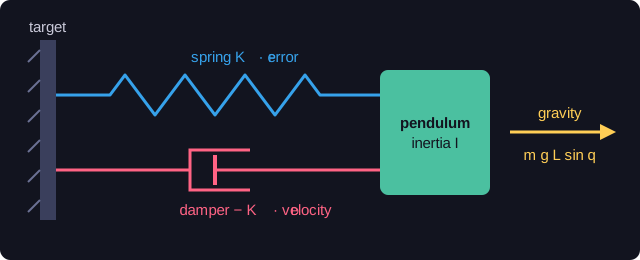
<p>The easiest way to picture it is as a spring and a damper:</p>

<p><img src="/humanoid-walking-lab/assets/images/week-1/spring_damper.svg" alt="PD controller as a spring and a damper" /></p>

<p>The spring (\(K_P\)) pulls toward the target, harder the further away the pendulum is. The damper (\(K_D\)) resists motion and stops the spring from bouncing forever.</p>

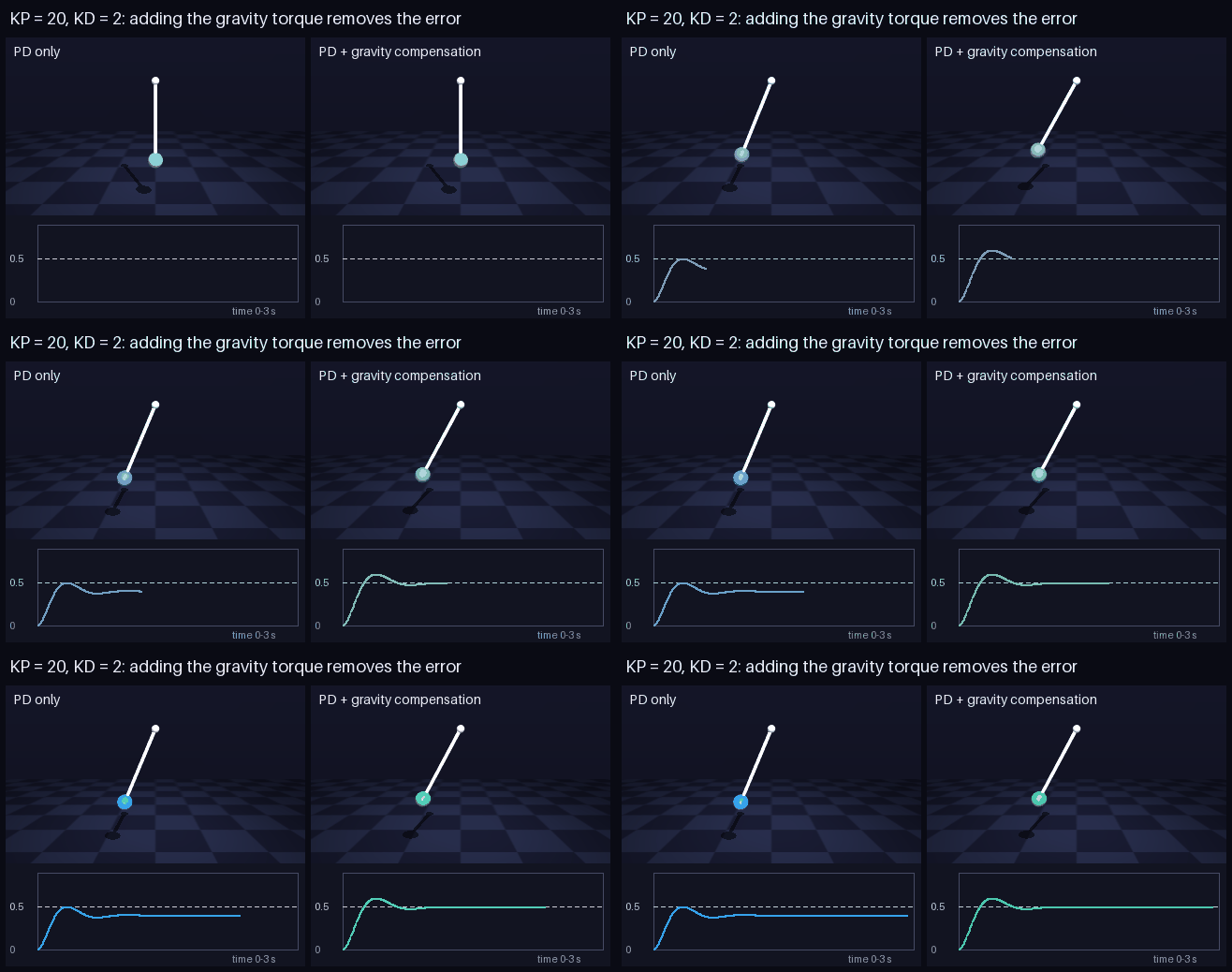
<p>With \(K_P = 20\), \(K_D = 2\) and a target of 0.5 rad, I expected the pendulum to settle at 0.5. It settled at 0.404 rad.</p>

<p>The reason becomes clear once you put the controller into Newton’s second law for rotation:</p>

\[I\,\ddot q = \underbrace{K_P\,(q^* - q) - K_D\,\dot q}_{\text{motor}} \; - \; \underbrace{m g L \sin q}_{\text{gravity}}\]

<p>At rest, both the acceleration and the velocity are zero, which leaves:</p>

\[K_P\,(q^* - q) = m g L \sin q\]

<p>The left side is the spring’s torque and the right side is gravity’s. If the error \(q^* - q\) were zero, the spring would push with zero torque while gravity still pulls down, and the pendulum couldn’t stay there. <strong>For the pendulum to hold still, there has to be an error</strong>, just enough stretch in the spring to carry the weight. Checking the numbers: \(20 \times 0.096 = 1.93\) N·m, which is gravity’s torque at 0.404 rad. This gap is called <em>steady-state error</em>.</p>

<h3 id="three-ways-to-close-the-gap">Three ways to close the gap</h3>

<p>Rearranging the balance shows the size of the error:</p>

\[q^* - q = \frac{m g L \sin q}{K_P}\]

<p>That points to three fixes.</p>

<p><strong>1. A stiffer spring.</strong> The error shrinks as \(1/K_P\). Going from \(K_P = 20\) to 80 to 320 reduced it from 0.096 to 0.028 to 0.007 rad. It never reaches zero, though, and as the next sections show, higher gains bring more overshoot, more torque, and eventually instability.</p>

<p><strong>2. An integral term.</strong> Add \(K_I \int (q^* - q)\,dt\) to the controller. As long as any error remains, the integral keeps growing and pushes harder, so the only place the pendulum can rest is zero error. The cost is a slower response and a tendency to overshoot when the motor saturates (called <em>windup</em>). I haven’t tried this one yet.</p>

<p><strong>3. Gravity compensation.</strong> If we know the gravity torque, we can simply add it to the motor command:</p>

\[\tau = K_P\,(q^* - q) - K_D\,\dot q + m g L \sin q\]

<p>In code, that’s one extra term:</p>

<div class="language-python highlighter-rouge"><div class="highlight"><pre class="highlight"><code><span class="n">data</span><span class="p">.</span><span class="n">ctrl</span><span class="p">[</span><span class="mi">0</span><span class="p">]</span> <span class="o">=</span> <span class="n">kp</span> <span class="o">*</span> <span class="p">(</span><span class="n">target</span> <span class="o">-</span> <span class="n">q</span><span class="p">)</span> <span class="o">-</span> <span class="n">kd</span> <span class="o">*</span> <span class="n">q_dot</span> <span class="o">+</span> <span class="n">m</span> <span class="o">*</span> <span class="n">g</span> <span class="o">*</span> <span class="n">L</span> <span class="o">*</span> <span class="n">np</span><span class="p">.</span><span class="n">sin</span><span class="p">(</span><span class="n">q</span><span class="p">)</span>
</code></pre></div></div>

<p>Put that into Newton’s law and gravity cancels out completely:</p>

\[I\,\ddot q = K_P\,(q^* - q) - K_D\,\dot q\]

<p>Now the rest condition is simply \(K_P\,(q^* - q) = 0\), so the error must be zero.</p>

<p><img src="/humanoid-walking-lab/assets/images/week-1/gravity_comp.gif" alt="Gravity compensation" /></p>

<p>In simulation it settled at exactly 0.5000 rad. The catch is that it needs an accurate model of the robot: its mass, its geometry, where its centre of mass is. On a real humanoid, that model is never perfect.</p>

<h3 id="predicting-the-motion">Predicting the motion</h3>

<p>Steady-state error describes where the pendulum ends up. To describe <em>how</em> it gets there, I linearized the system around its resting angle. It then behaves like a mass on a spring with a damper, with total stiffness:</p>

\[k = K_P + m g L \cos q\]

<p>Gravity adds a small extra stiffness of its own, \(m g L \cos q\); that’s where the cosine appears. From \(k\) and \(I\) come the two numbers that describe the whole response:</p>

\[\omega_n = \sqrt{\frac{k}{I}} \qquad\qquad \zeta = \frac{K_D}{2\sqrt{k\, I}}\]

<p>The natural frequency \(\omega_n\) sets how fast it responds. The damping ratio \(\zeta\) sets how much it overshoots: below 1 it overshoots and wobbles, at exactly 1 it reaches the target fastest without overshooting, and above 1 it creeps in slowly. From these, the overshoot and settling time follow:</p>

\[\text{overshoot} = \text{step} \cdot e^{-\pi\zeta/\sqrt{1-\zeta^2}} \qquad\quad t_{\text{settle}} \approx \frac{4}{\zeta\,\omega_n}\]

<p>I implemented these formulas and ran sweeps over the gains to compare them with the simulation. Each formula is a one-line function in <a href="https://github.com/SakshayMahna/humanoid-walking-lab/blob/main/exercises/02_pendulum_pd/pd_experiments.py"><code class="language-plaintext highlighter-rouge">pd_experiments.py</code></a>:</p>

<div class="language-python highlighter-rouge"><div class="highlight"><pre class="highlight"><code><span class="k">def</span> <span class="nf">natural_frequency</span><span class="p">(</span><span class="n">k_eff</span><span class="p">,</span> <span class="n">I</span><span class="p">):</span>
    <span class="k">return</span> <span class="n">np</span><span class="p">.</span><span class="n">sqrt</span><span class="p">(</span><span class="n">k_eff</span> <span class="o">/</span> <span class="n">I</span><span class="p">)</span>

<span class="k">def</span> <span class="nf">damping_ratio</span><span class="p">(</span><span class="n">kd</span><span class="p">,</span> <span class="n">k_eff</span><span class="p">,</span> <span class="n">I</span><span class="p">):</span>
    <span class="k">return</span> <span class="n">kd</span> <span class="o">/</span> <span class="p">(</span><span class="mi">2</span> <span class="o">*</span> <span class="n">np</span><span class="p">.</span><span class="n">sqrt</span><span class="p">(</span><span class="n">k_eff</span> <span class="o">*</span> <span class="n">I</span><span class="p">))</span>

<span class="k">def</span> <span class="nf">predicted_overshoot</span><span class="p">(</span><span class="n">zeta</span><span class="p">,</span> <span class="n">step</span><span class="p">):</span>
    <span class="k">if</span> <span class="n">zeta</span> <span class="o">&lt;</span> <span class="mi">1</span><span class="p">:</span>
        <span class="k">return</span> <span class="n">step</span> <span class="o">*</span> <span class="n">np</span><span class="p">.</span><span class="n">exp</span><span class="p">(</span><span class="o">-</span><span class="n">np</span><span class="p">.</span><span class="n">pi</span> <span class="o">*</span> <span class="n">zeta</span> <span class="o">/</span> <span class="n">np</span><span class="p">.</span><span class="n">sqrt</span><span class="p">(</span><span class="mi">1</span> <span class="o">-</span> <span class="n">zeta</span><span class="o">**</span><span class="mi">2</span><span class="p">))</span>
    <span class="k">return</span> <span class="mf">0.0</span>
</code></pre></div></div>

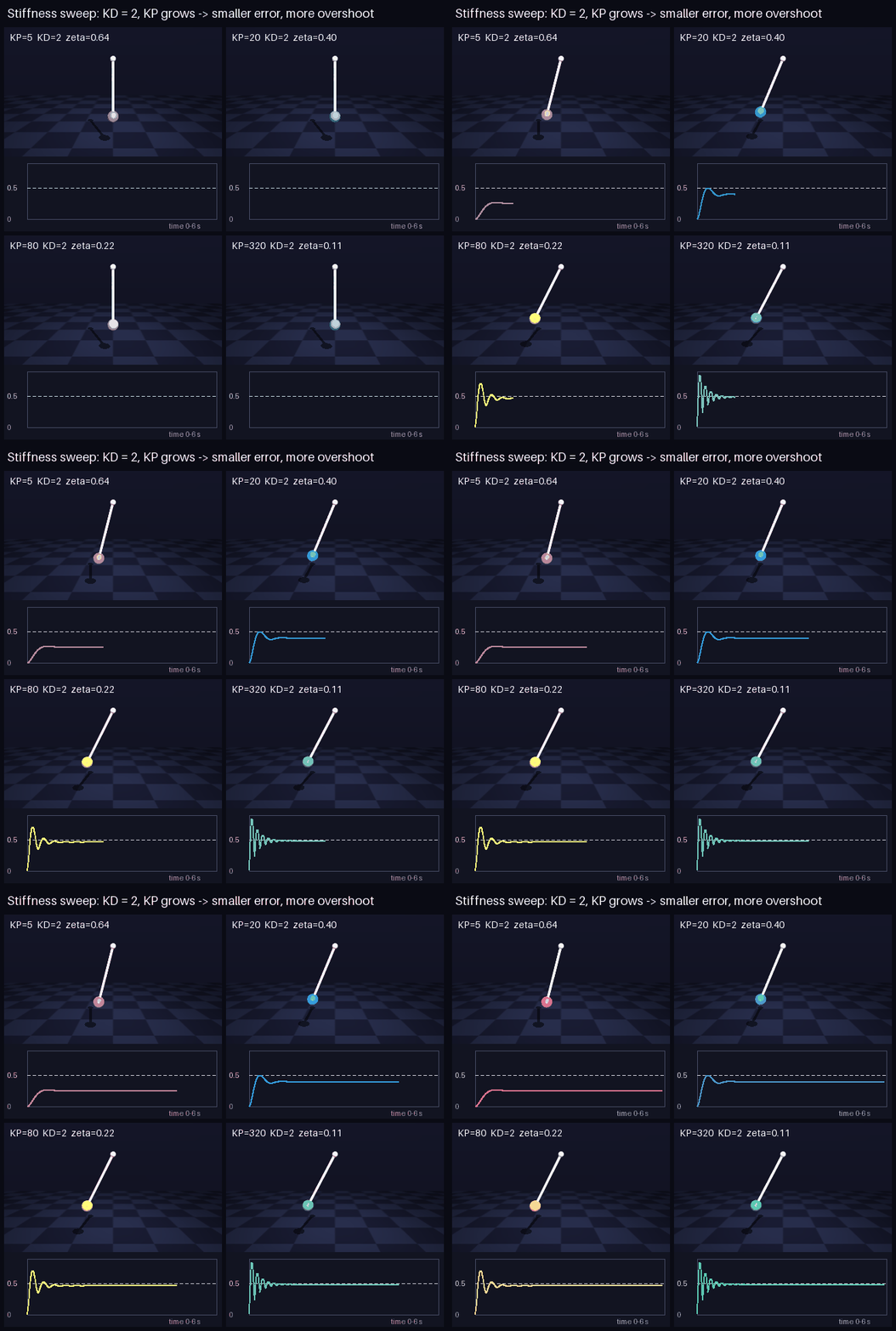
<p><img src="/humanoid-walking-lab/assets/images/week-1/pd_stiffness.gif" alt="Stiffness sweep" /></p>

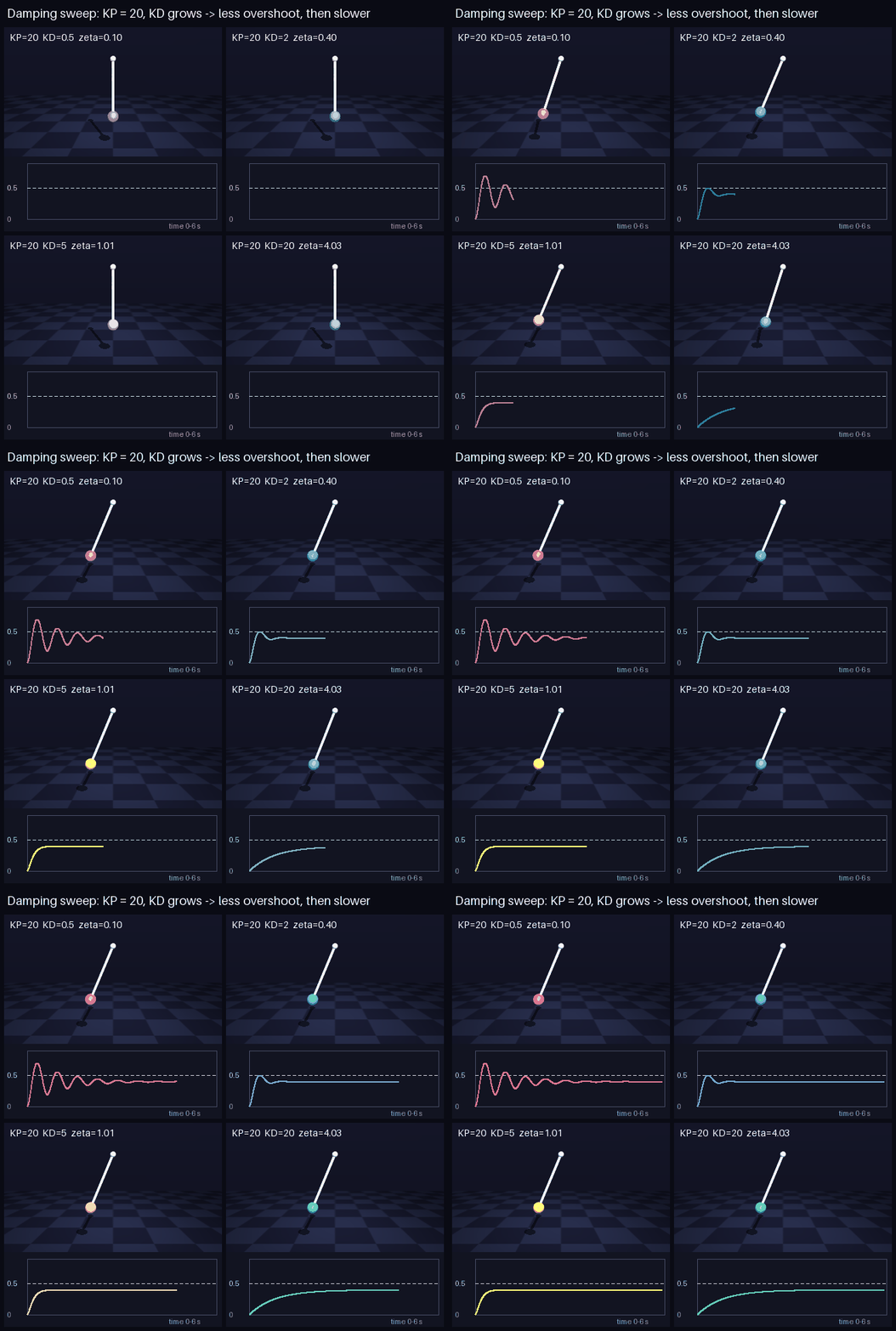
<p><img src="/humanoid-walking-lab/assets/images/week-1/pd_damping.gif" alt="Damping sweep" /></p>

<table>
  <thead>
    <tr>
      <th>KP</th>
      <th>KD</th>
      <th>ζ</th>
      <th>final angle (sim / theory)</th>
      <th>overshoot (sim / theory)</th>
    </tr>
  </thead>
  <tbody>
    <tr>
      <td>5</td>
      <td>2</td>
      <td>0.64</td>
      <td>0.254 / 0.252</td>
      <td>0.018 / 0.019</td>
    </tr>
    <tr>
      <td>20</td>
      <td>2</td>
      <td>0.40</td>
      <td>0.404 / 0.402</td>
      <td>0.100 / 0.101</td>
    </tr>
    <tr>
      <td>80</td>
      <td>2</td>
      <td>0.22</td>
      <td>0.472 / 0.471</td>
      <td>0.234 / 0.234</td>
    </tr>
    <tr>
      <td>320</td>
      <td>2</td>
      <td>0.11</td>
      <td>0.493 / 0.492</td>
      <td>0.348 / 0.347</td>
    </tr>
    <tr>
      <td>20</td>
      <td>0.5</td>
      <td>0.10</td>
      <td>0.404 / 0.402</td>
      <td>0.295 / 0.292</td>
    </tr>
    <tr>
      <td>20</td>
      <td>5</td>
      <td>1.01</td>
      <td>0.404 / 0.402</td>
      <td>0.000 / 0.000</td>
    </tr>
  </tbody>
</table>

<p>Watching a few lines of maths predict the simulation this closely was the best part of the week. The sweeps also made some trade-offs concrete. More \(K_P\) means a smaller error but more overshoot and more torque. More \(K_D\) removes overshoot, but too much makes the response slow again; \(K_D = 20\) took 3 s to settle. Settling speed depends only on \(K_D\) and inertia, because \(\zeta\,\omega_n = K_D / 2I\) and \(K_P\) cancels out, which is why every \(K_D = 2\) run settles in about a second. And critical damping isn’t the fastest option: \(\zeta = 0.8\) settled in 0.38 s with barely any overshoot, quicker than \(\zeta = 1\).</p>

<h3 id="when-the-simulation-breaks">When the simulation breaks</h3>

<p>Those formulas assume time flows smoothly, but the simulator moves in steps of \(\Delta t\). If the gains are too high, a single step overcorrects by more than the original error, and the error grows from step to step. For the damping term alone, each step multiplies the velocity by a fixed factor:</p>

\[v_{n+1} = \left(1 - \frac{K_D\,\Delta t}{I}\right) v_n\]

<p>As long as that factor stays between −1 and 1, the motion dies out. Below −1, the velocity flips sign and grows every step. The spring term has a similar limit, and on their own the two give:</p>

\[K_{D,\max} = \frac{2I}{\Delta t} \approx 100 \qquad\quad K_{P,\max} \approx I\left(\frac{2}{\Delta t}\right)^2 \approx 40{,}000\]

<p>These are limits for each term alone, not a combined guarantee. When stiffness and damping act together, a step updates position and velocity jointly, and for this integrator the condition becomes:</p>

\[(\omega_n \Delta t)^2 + \frac{2 K_D\, \Delta t}{I} &lt; 4\]

<p>The individual limits are just the cases where one gain is close to zero. A large \(K_D\) leaves less room for \(K_P\), and the other way around. The simulation matched: \(K_D = 99\) was fine and 101 exploded; \(K_P = 38{,}000\) survived (badly) and 42,000 exploded. Plugging those four runs into the condition gives 3.95, 4.03, 3.87 and 4.26: below 4 for the stable runs and above 4 for the ones that exploded.</p>

<h2 id="mujocos-own-actuators">MuJoCo’s own actuators</h2>

<h3 id="the-position-actuator">The position actuator</h3>

<p>MuJoCo has a built-in <code class="language-plaintext highlighter-rouge">position</code> actuator. Every MuJoCo actuator computes its force from one general formula:</p>

\[\text{force} = \text{gain}_0 \cdot \text{ctrl} + \text{bias}_0 + \text{bias}_1\, q + \text{bias}_2\, \dot q\]

<p>Swapping my motor for a position actuator is a one-line change in the XML:</p>

<div class="language-xml highlighter-rouge"><div class="highlight"><pre class="highlight"><code><span class="nt">&lt;position</span> <span class="na">joint=</span><span class="s">"hinge"</span> <span class="na">kp=</span><span class="s">"20"</span> <span class="na">kv=</span><span class="s">"2"</span><span class="nt">/&gt;</span>
</code></pre></div></div>

<p>and the parameters MuJoCo built from it can be printed:</p>

<div class="language-python highlighter-rouge"><div class="highlight"><pre class="highlight"><code><span class="k">print</span><span class="p">(</span><span class="n">model</span><span class="p">.</span><span class="n">actuator_gainprm</span><span class="p">[</span><span class="mi">0</span><span class="p">,</span> <span class="p">:</span><span class="mi">3</span><span class="p">])</span>   <span class="c1"># [ 20.   0.   0.]
</span><span class="k">print</span><span class="p">(</span><span class="n">model</span><span class="p">.</span><span class="n">actuator_biasprm</span><span class="p">[</span><span class="mi">0</span><span class="p">,</span> <span class="p">:</span><span class="mi">3</span><span class="p">])</span>   <span class="c1"># [  0. -20.  -2.]
</span></code></pre></div></div>

<p>A position actuator sets the gain to \([K_P, 0, 0]\) and the bias to \([0, -K_P, -K_D]\). Substituting gives \(K_P(\text{ctrl} - q) - K_D\,\dot q\): my PD controller, with <code class="language-plaintext highlighter-rouge">ctrl</code> as the target angle. Running both versions side by side, the trajectories matched to \(10^{-17}\) rad, which is just floating-point rounding.</p>

<h3 id="implicit-integration">Implicit integration</h3>

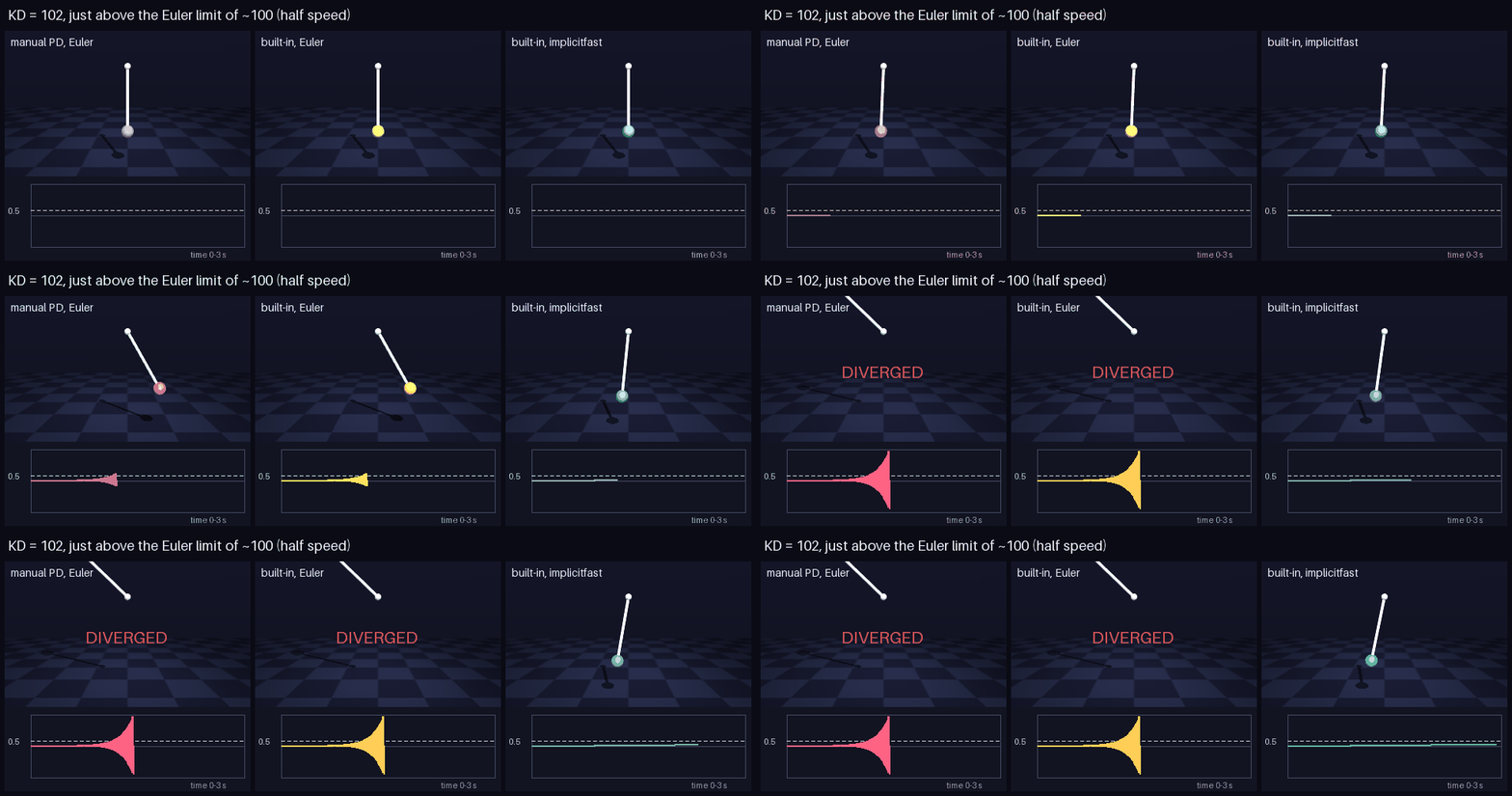
<p>The two versions only behave differently beyond the stability limit. With \(K_D = 102\), just past it, I switched MuJoCo to its <code class="language-plaintext highlighter-rouge">implicitfast</code> integrator, which again is one attribute:</p>

<div class="language-xml highlighter-rouge"><div class="highlight"><pre class="highlight"><code><span class="nt">&lt;option</span> <span class="na">timestep=</span><span class="s">"0.005"</span> <span class="na">integrator=</span><span class="s">"implicitfast"</span><span class="nt">/&gt;</span>
</code></pre></div></div>

<p><img src="/humanoid-walking-lab/assets/images/week-1/integrator.gif" alt="Integrator and stability" /></p>

<p>My Python PD still exploded, but the built-in actuator stayed stable. An implicit integrator applies damping using the <strong>end-of-step</strong> velocity, and that update can never overcorrect, whatever the gain:</p>

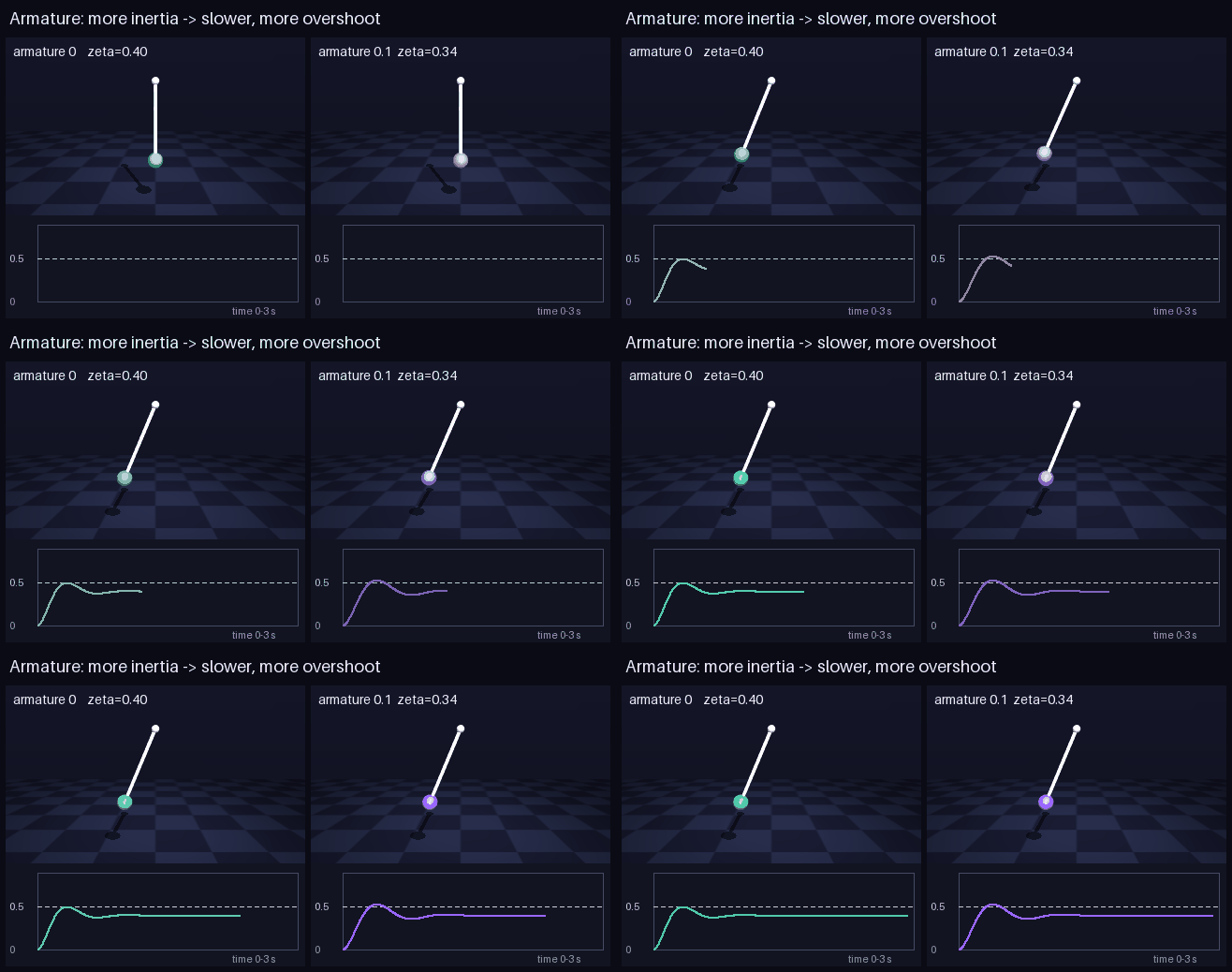
\[v_{n+1} = \frac{v_n}{1 + K_D\,\Delta t / I}\]

<p>To do this, MuJoCo needs to know that the force depends on velocity. For the built-in actuator it knows the formula. For my Python PD it only receives a number, so it can’t help. That’s a practical reason to let MuJoCo compute the PD inside its actuators, and a reminder to use the same integrator as in training.</p>

<h3 id="torque-limits">Torque limits</h3>

<p>Real motors have a maximum torque. In MuJoCo that’s two attributes on the actuator:</p>

<div class="language-xml highlighter-rouge"><div class="highlight"><pre class="highlight"><code><span class="nt">&lt;position</span> <span class="na">joint=</span><span class="s">"hinge"</span> <span class="na">kp=</span><span class="s">"20"</span> <span class="na">kv=</span><span class="s">"2"</span> <span class="na">forcelimited=</span><span class="s">"true"</span> <span class="na">forcerange=</span><span class="s">"-1 1"</span><span class="nt">/&gt;</span>
</code></pre></div></div>

<p>I limited the actuator to 1 N·m, although holding the pendulum near the target needs 1.93 N·m. I expected it to settle at a lower angle. Instead, it kept swinging between 0 and 0.414 rad and never stopped.</p>

<p><img src="/humanoid-walking-lab/assets/images/week-1/torque_limit.gif" alt="Torque limit" /></p>

<p>The PD controller asks for more than 1 N·m the whole time, so the motor delivers a constant 1 N·m. A constant torque doesn’t depend on velocity, so the damping term gets clamped away along with everything else. What remains is a pendulum with gravity, a constant push and no damping, oscillating around the angle where gravity equals 1 N·m (0.205 rad). This is <em>actuator saturation</em>: when the requested PD torque goes past the motor’s limit, it gets clipped, and for as long as that lasts the controller can’t deliver the damping it was designed for. Here the saturation never ended, so the damping never came back.</p>

<h3 id="armature">Armature</h3>

<p>A motor drives its joint through a gearbox and spins much faster than the joint does. Seen from the joint, the rotor’s inertia gets multiplied by the gear ratio squared. MuJoCo calls this <code class="language-plaintext highlighter-rouge">armature</code> and simply adds it to the joint’s inertia:</p>

<div class="language-xml highlighter-rouge"><div class="highlight"><pre class="highlight"><code><span class="nt">&lt;joint</span> <span class="na">name=</span><span class="s">"hinge"</span> <span class="na">type=</span><span class="s">"hinge"</span> <span class="na">axis=</span><span class="s">"0 1 0"</span> <span class="na">armature=</span><span class="s">"0.1"</span><span class="nt">/&gt;</span>
</code></pre></div></div>

<p>After <code class="language-plaintext highlighter-rouge">mj_forward</code>, <code class="language-plaintext highlighter-rouge">data.M[0]</code> (the joint inertia MuJoCo uses) goes from 0.251 to 0.351.
All the actuator experiments are in <a href="https://github.com/SakshayMahna/humanoid-walking-lab/blob/main/exercises/02_pendulum_pd/pendulum_pd.py"><code class="language-plaintext highlighter-rouge">pendulum_pd.py</code></a>.</p>

<p><img src="/humanoid-walking-lab/assets/images/week-1/armature.gif" alt="Armature" /></p>

<table>
  <thead>
    <tr>
      <th> </th>
      <th>inertia</th>
      <th>ω_n</th>
      <th>ζ</th>
      <th>overshoot</th>
      <th>settle</th>
    </tr>
  </thead>
  <tbody>
    <tr>
      <td>no armature</td>
      <td>0.251</td>
      <td>9.88</td>
      <td>0.40</td>
      <td>0.100</td>
      <td>0.84 s</td>
    </tr>
    <tr>
      <td>armature 0.1</td>
      <td>0.351</td>
      <td>8.36</td>
      <td>0.34</td>
      <td>0.129</td>
      <td>1.31 s</td>
    </tr>
  </tbody>
</table>

<p>More inertia makes the response slower and less damped, just as the formulas predict. The final angle stays the same, because at rest nothing accelerates and inertia plays no part.</p>

<h2 id="from-the-pendulum-to-a-walking-humanoid">From the pendulum to a walking humanoid</h2>

<p>All of this matters for the G1 because of where the controller sits. A walking policy could output torques directly, putting control <em>inside</em> the policy. The G1 policy I’m reproducing outputs <strong>joint targets</strong> instead, and MuJoCo’s position actuators turn them into torques with exactly the PD law above. Control sits <em>outside</em> the policy, in the simulator. Following the usual convention in legged-robot learning, each action is a scaled offset from a default pose:</p>

\[q^* = q_{\text{default}} + \text{scale} \cdot \text{action}, \qquad \tau = K_P\,(q^* - q) - K_D\,\dot q\]

<p>So each pendulum lesson carries over. Because of steady-state error, the policy has learned to aim <em>past</em> the angle it really wants, so that the PD error produces the right torque; change \(K_P\) and every learned action means a different torque. The G1’s gains are computed from each joint’s armature, choosing a 10 Hz natural frequency (\(\omega_n = 2\pi \times 10 \approx 62.8\) rad/s) and a damping ratio of 2, through \(K_P = I\,\omega_n^2\) and \(K_D = 2\zeta I \omega_n\), the same formulas as above. Every joint also has a torque limit. Brief saturation is usually fine, but while a joint is saturated its PD torque is clipped and it can’t guarantee the damping it was tuned for, so persistent saturation can lead to oscillation. And the timestep and integrator have to match training: the policy acts at 50 Hz on top of 200 Hz physics.</p>

<h2 id="how-im-learning">How I’m learning</h2>

<p>I’m using Claude as a tutor for this project. It suggests the next exercise, explains concepts when I get stuck, and reviews my code, while I write most of it myself. Having something that walks me through a structured sequence and asks “why do you think that happened?” has made a big difference to how quickly I get from confusion to understanding.</p>

<h2 id="next-week">Next week</h2>

<p>Next week I’ll build the full G1 setup in plain MuJoCo: a floor, 29 position actuators with the right gains, the starting pose, the 99-number observation and the 50 Hz control loop. Then I’ll load the trained policy and, hopefully, watch it walk.</p>]]></content><author><name></name></author><category term="blog" /><summary type="html"><![CDATA[Loading the Unitree G1 in MuJoCo, an integrator error I could predict to the millimetre, and what a single pendulum taught me about PD control, stability and actuators.]]></summary></entry></feed>